

A standard Customer Relationship Management (CRM) system is great for tracking sales, but for a marketing agency, it's like using a basic hammer to build a skyscraper. It simply isn't the right tool for the job. A specialized CRM for marketing agencies must be the central command center for everything, from client project management and profitability tracking to proving campaign ROI with hard data.
This isn't just another tool; it's your operational core.
Why Your Agency Needs More Than Just a CRM
A generic CRM tracks leads and deals. That's its primary function. It falls painfully short when managing the complex, multi-faceted relationships and projects that are the lifeblood of a marketing agency. You're not just selling a product; you're delivering a continuous, evolving service with countless moving parts.
This disconnect between a standard sales pipeline and the day-to-day reality of agency work creates friction, leading to data silos, endless manual entry, and missed opportunities.

The right system must go far beyond simple contact management. It needs to weave project delivery, time tracking, and financial reporting directly into the client record. This creates a single source of truth that empowers your team and offers unparalleled transparency for your clients.
Bridging the Gap Between Sales and Delivery
For many agencies, chaos begins the moment a new client signs on. The sales team's promises, neatly captured in one system, must be manually translated into project plans, tasks, and deliverables in another. This handover is precisely where critical details get lost, leading to scope creep and unhappy clients.
A purpose-built CRM for marketing agencies eliminates this by uniting the entire client lifecycle.
- Seamless Project Onboarding: Imagine converting a "closed-won" deal directly into a project. The system can automatically populate tasks, assign team members, and set initial deadlines based on the original proposal. No more redundant data entry.
- Unified Client Communication: All emails, meetings, and project updates are logged in one central place. Any team member can instantly access a complete history of the client relationship without digging through old inboxes.
- Real-time Profitability Tracking: By linking time tracking and expenses directly to client projects, you can finally see which accounts are truly profitable and which ones are secretly draining your resources.
The core function of an agency-specific CRM is to provide a 360-degree view of each client. It should connect every billable hour and marketing campaign right back to the initial sales conversation and the overall financial health of that account.
Proving Your Value with Data
Ultimately, clients stick with agencies that deliver measurable results. A generic CRM struggles to connect a specific marketing campaign to a closed deal three months later because it lacks the structure for multi-touch attribution or effective client lifetime value tracking.
This is a common pain point where a CRM that provides a structured way to manage and analyze customer data becomes invaluable. You can learn more by exploring the top 5 benefits of using a CRM for your business in our detailed guide.
A specialized CRM is designed to answer the tough questions clients ask, transforming your agency from just another service provider into an indispensable strategic partner.
Pinpointing Your Agency's True CRM Needs
Jumping into CRM demos without a clear game plan is a classic agency mistake. It’s like grocery shopping while hungry and without a list, you leave with a cart full of impressive gadgets but forget the essentials. Before getting dazzled by flashy dashboards and AI promises, the first step is to map out what your agency truly needs to solve its most painful operational problems.
This begins with an honest look at your current client lifecycle. Map out every touchpoint on a whiteboard, from the moment a lead enters your pipeline to the final invoice. Be ruthless. Where do things consistently get dropped or slow to a crawl?
Uncovering Operational Friction Points
As you map this journey, the friction points will become obvious. Are your account managers burning hours manually creating tasks in Asana after a deal closes? Is your finance team constantly chasing project managers for billable hours? These bottlenecks are precisely what a well-chosen CRM for marketing agencies is designed to fix.
Your mission here is to get granular and move beyond vague requirements. Zero in on the specific, painful inefficiencies.
- The Sales-to-Service Handoff: Where does a lead become a client? Is it a smooth, automated transition, or does it involve copying and pasting information into three different systems, praying nothing gets lost?
- Project Profitability Blind Spots: Can you, at a glance, see which projects are making you money and which are secretly draining resources? Or is profitability a mystery solved only with a spreadsheet at the end of the quarter?
- The Reporting Grind: How much non-billable time does your team spend compiling data from five different sources just to build a client report? A solid CRM should centralize this, turning hours of work into a few clicks.
The goal isn’t just to find a CRM. It’s to find a solution that plugs the specific leaks in your agency's operational dam. A system that automates the chaotic handoff from sales to project management can easily save dozens of hours a month.
Once you have a list of these pain points, you can translate them into a concrete feature list. For a deeper dive into the full evaluation process, we've laid out more guidance on how to choose a CRM system in our complete article.
Differentiating Must-Haves from Nice-to-Haves
With a clear picture of your problems, you can now sort potential CRM features into two simple buckets: must-haves and nice-to-haves. This helps you avoid the common pitfall of prioritizing an advanced AI forecasting tool when your team is still wrestling with basic contact management in a shared spreadsheet.
A dashboard, like this example from Salesforce Sales Cloud, gives you a quick visual on your sales health, pipeline status, and top deals.
For any agency serious about growth, this kind of at-a-glance visibility is a definite 'must-have'.
When building your own list, think in these terms:
- Core Sales & Contact Management: This is the baseline. You need a clean, central database for every client and prospect, complete with a visual pipeline to track deals from initial contact to closed-won. Non-negotiable.
- Project & Task Management Integration: A massive 'must-have' for agencies. Your CRM must either have its own project management tools or offer seamless integration with the platforms your team already uses, like Asana, Monday.com, or Jira.
- Financial & Profitability Reporting: Can the system track time and expenses against projects to give you a real-time pulse on profitability? For agencies looking to scale smartly, this moves from a nice-to-have to a critical requirement.
- Marketing Automation & Attribution: This connects your marketing campaigns directly to sales outcomes. It’s absolutely vital for a performance marketing agency but might be a 'nice-to-have' for a purely creative or brand-focused shop.
By creating a prioritized list rooted in your documented bottlenecks, you build a powerful evaluation tool. This requirements document becomes your north star, ensuring you choose a CRM for marketing agencies that solves your real-world challenges, not just the ones a slick sales demo wants you to see.
Essential CRM Features by Marketing Agency Type
Not all agencies are built the same, and your CRM needs should reflect your core business model. A high-volume performance agency has vastly different day-to-day needs than a boutique branding studio.
This table illustrates why a one-size-fits-all approach to CRM selection rarely works. By matching your agency's specific service delivery model to the feature set, you can narrow down your options to systems that will truly support your workflow, not fight against it.
Building a Connected Agency Tech Stack
A powerful CRM sitting in isolation is like a brilliant conductor with no orchestra. It has immense potential, but it can't create a symphony on its own. The real magic happens when your CRM for marketing agencies becomes the central hub of your tech stack, communicating seamlessly with every other tool your team relies on. This is what turns it from a simple database into the operational core of your agency.
When systems don't talk to each other, you create invisible work. Team members waste time on manual data entry, critical client information gets trapped in silos, and a complete picture of a client’s journey remains frustratingly out of reach. A connected ecosystem fixes this by creating a single, fluid current of information that flows from one platform to the next.
Creating a Single Source of Client Truth
The ultimate goal is a true 360-degree view of your clients. This means anyone on your team, from sales to project management to finance, can instantly access a complete, up-to-date client history without digging through old emails or scattered spreadsheets.
This unified view is built by strategically linking your most important operational tools directly to the CRM.
- Project Management Integration (e.g., Asana, Jira): When a deal is marked "closed-won" in your CRM, a new project should automatically launch in your PM tool. This link ensures all project details, budgets, and client expectations are transferred perfectly, eliminating the risky manual handoff between sales and delivery.
- Accounting Software Integration (e.g., QuickBooks, Xero): Syncing your CRM with your accounting platform puts invoicing on autopilot. Imagine a project milestone being completed in the CRM, which then automatically generates an invoice. This small change drastically reduces admin work and accelerates cash flow.
- Communication Tool Integration (e.g., Slack, Microsoft Teams): Get an instant ping in a dedicated Slack channel the moment a high-value deal moves to the proposal stage. This real-time visibility keeps the entire team aligned and engaged.
A truly integrated CRM doesn't just hold data; it puts it to work. Information from one system triggers a meaningful action in another, creating a chain of automated efficiency that frees up your team for what they do best: high-value, strategic client work.
Closing the Loop on Campaign Attribution
For any marketing agency, the most critical connection is between your CRM and your marketing automation platform, like HubSpot or ActiveCampaign. This integration is what finally lets you prove your marketing ROI by bridging your marketing activities directly to actual sales revenue.
When these systems are linked, you can trace a prospect's entire journey. You can see the exact ad they clicked, the blog post they read, and the email sequence that nurtured them, all within their CRM contact record, right next to the final deal value. To dig deeper into how these connections function, explore the fundamentals of what CRM integration is in our detailed guide.
This insight moves your reporting from vanity metrics to tangible business impact.
Prioritizing Connectivity in Your Selection Process
The market is clearly shifting. Agencies are moving away from isolated tools and toward cohesive ecosystems powered by AI and seamless integrations. 74% of SMEs rank integration with other business tools as their top priority for CRM selection. They're looking to connect marketing data with sales, finance, and operations to create a single, unified command center. You can discover more insights about these CRM statistics and see how significant this trend has become.
This focus on connectivity highlights a fundamental truth: the best CRM for marketing agencies is the one that makes the tools you already use even better. It should act as the intelligent hub that makes your entire tech stack smarter, faster, and more effective, driving both client success and your own agency's growth.
Structuring Your CRM to Prove Marketing ROI
Once your tech stack is interconnected, your CRM evolves from a glorified address book into your most powerful tool for proving your agency's value. This is where you graduate from simply tracking leads to telling a compelling, data-driven story about your impact. The objective is to structure your data to follow a prospect’s entire journey, from their first ad click to the day they sign as a happy client.
A well-architected CRM for marketing agencies doesn't just hold information; it illuminates the path to revenue. The end goal is to build a system where you can confidently point to a specific campaign and say, "This is exactly how much new business we generated."
Custom Fields: The Bedrock of Granular Tracking
Standard CRM fields like 'Name' and 'Company' are just the starting point. To truly track marketing effectiveness, you need to create custom fields that capture the specific data points that matter to your agency and your clients. These fields are the building blocks of attribution.
Think of them as the digital breadcrumbs a lead leaves behind.
- Lead Source (Original): This is mission-critical. Where did they first come from? Organic search, a referral, a paid social ad, a trade show? This field should be locked once set to maintain the integrity of your source data.
- Lead Source (Detail): Now, get specific. If the source was 'Paid Social,' this field might be 'LinkedIn Ad - Q2 eBook Campaign.' This level of detail is necessary to compare what’s working and what isn’t.
- UTM Parameters: Don't rely on guesswork. Create separate fields to automatically capture UTM source, medium, campaign, content, and term from your marketing URLs. This provides crystal-clear, undeniable data on which links and ads are driving traffic.
This detailed data collection turns a simple contact list into a rich, insightful map of your client's journey.
The diagram below shows how data should ideally flow, from project management into the CRM as the central hub, and finally over to your accounting systems to close the loop on the client lifecycle.
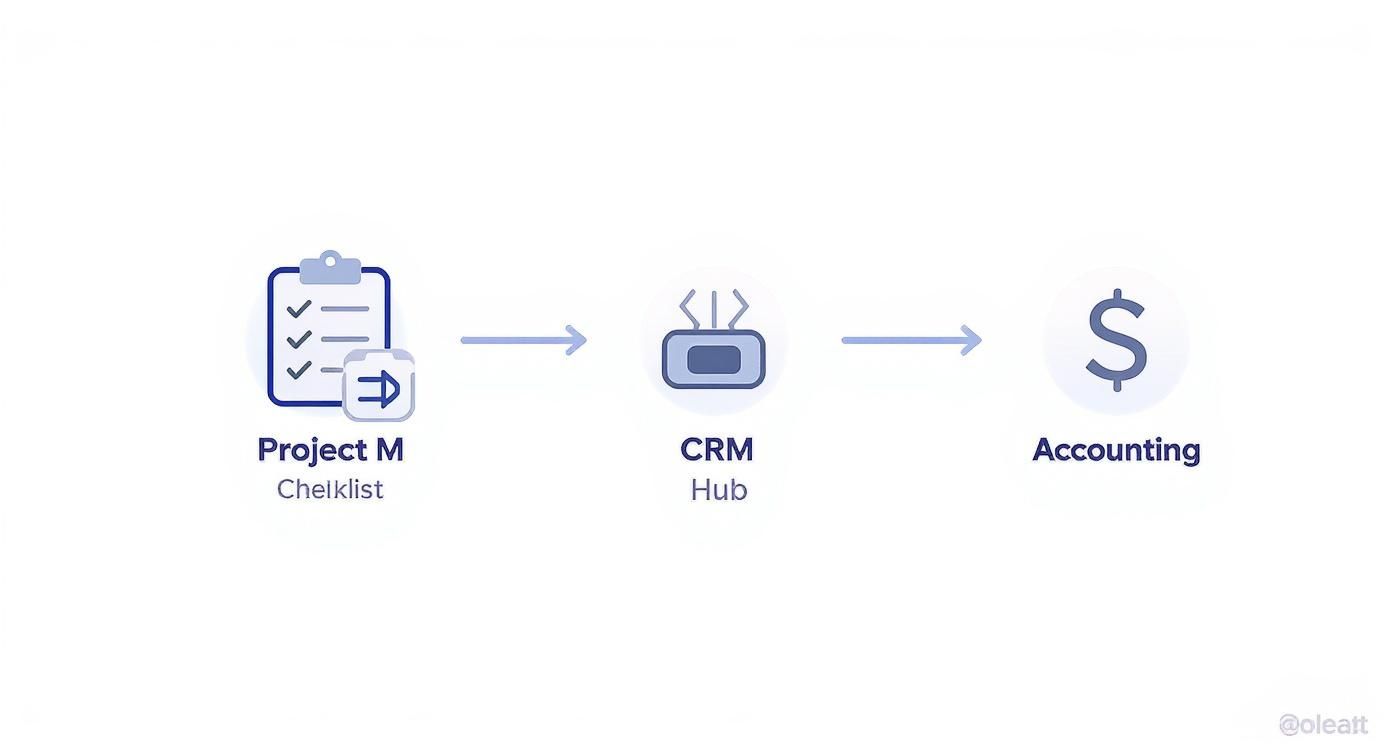
Think of this as the gold standard. Your CRM becomes the single source of truth, ensuring your operational and financial data are always perfectly aligned with the status of every client project.
Choosing the Right Attribution Model
With clean data flowing in, the next decision is how you're going to assign credit for a sale. Different attribution models tell different stories about your marketing performance, and a good CRM for marketing agencies will let you switch between them to see the full picture.
- First-Touch Attribution: This model gives 100% of the credit to the very first interaction. It’s fantastic for identifying which channels are best at generating brand new awareness and filling the top of your funnel.
- Last-Touch Attribution: The polar opposite, this one gives all credit to the final touchpoint before conversion. It's useful for identifying which marketing efforts are the most effective closers.
- Multi-Touch Attribution (Linear or U-Shaped): For most agencies, this is where the real insights lie. A linear model spreads credit evenly across every touchpoint, while a U-shaped model emphasizes the first and last interactions. This approach rightly acknowledges that the entire customer journey contributed to the sale, not just a single moment.
Your ability to demonstrate value hinges on connecting marketing actions to financial outcomes. A properly configured CRM makes this connection undeniable, turning your reports from a list of activities into a compelling narrative of business growth.
A Real-World Scenario: Tracking a LinkedIn Ad
Let's walk through a quick example. A prospect sees a LinkedIn ad for your client's new whitepaper and clicks on it.
- The Click: UTM parameters immediately and automatically populate the CRM fields:
utm_source=linkedin,utm_medium=cpc, andutm_campaign=q3_whitepaper. - The Conversion: The prospect fills out the landing page form. Your CRM creates a new contact, stamping their record with 'Lead Source (Original)' as 'Paid Social' and 'Lead Source (Detail)' as 'LinkedIn Whitepaper Ad.'
- The Nurture: Over the next few weeks, they attend a webinar and open several marketing emails. Each of these interactions is logged in their contact record.
- The Deal: Finally, they request a demo. The sales team works their magic, and they become a customer worth $30,000.
Because you structured your CRM correctly, you can now run a report that clearly shows the Q3 LinkedIn campaign directly sourced a $30,000 deal. This is how you prove your worth and justify marketing spend.
Building dashboards that tell this story is a critical skill. To dive deeper into the nuts and bolts, check out our guide on how to measure marketing ROI. This data-driven approach transforms your client conversations from subjective debates into objective, value-focused discussions.
Automating Your Way to Agency Efficiency
Once you have a solid CRM and a connected tech stack, you can unlock your agency's true superpower: automation. This isn't about replacing your team; it's about freeing them from the low-value, repetitive work that kills creativity and consumes billable hours. A well-implemented CRM for marketing agencies becomes the engine driving your efficiency, letting you scale operations without scaling burnout.
The goal is to build a series of automated 'playbooks', pre-defined sequences of actions that trigger based on specific events. These playbooks are your key to consistency, slashing human error and creating a seamless experience for both your team and your clients. The result? A calmer, more productive agency that can focus on strategic, high-impact work.

Intelligent Lead Assignment and Follow-Up
How quickly you respond to a new lead can make or break a deal. Research shows that contacting a lead within five minutes dramatically increases conversion rates. However, manual assignment is slow, clunky, and inconsistent. Automation fixes this instantly.
Imagine a prospect fills out the 'Contact Us' form on your website. Instead of that lead languishing in a general inbox, an automated workflow kicks in immediately:
- Immediate Routing: The CRM scans the form data. Based on industry or company size, it automatically assigns the lead to the sales rep with the most relevant expertise.
- Task Creation: A task instantly appears for that rep: "Follow up with Jane Doe from ABC Corp." It’s due within the hour and contains all the information the lead submitted. No digging required.
- Confirmation Email: Simultaneously, the prospect receives a personalized email acknowledging their request and informing them who will be in touch shortly.
This simple workflow ensures no lead ever falls through the cracks and every prospect gets a fast, professional response.
Seamless Client Onboarding Sequences
The moment a contract is signed is a critical first impression. A clunky, manual onboarding process creates friction and plants a seed of doubt. A CRM-driven automation playbook, on the other hand, ensures a flawless handoff every time.
When a deal is marked as 'Closed-Won' in your CRM, it shouldn't be the end of a process. It should be the trigger that begins a new, perfectly orchestrated one, the client success journey.
Here’s what an automated onboarding sequence looks like:
- Project Kickoff: The 'Closed-Won' status automatically creates a new project in your project management tool (like Asana or Monday.com), pulling from a pre-built template based on the services sold.
- Team Notifications: Your assigned Account Manager and Project Manager get an instant Slack or email notification with a link to the new client record and project workspace.
- Client Welcome: The new client receives a branded welcome email introducing their main point of contact, outlining next steps, and providing a link to schedule their kickoff call.
This removes the administrative burden from your team and gives new clients immediate confidence that they made the right choice. Nailing these workflows is a huge part of any successful marketing automation implementation.
Proactive Project and Budget Alerts
Managing scope creep and keeping projects on budget is a major headache for any agency. Instead of relying on manual checks, you can build automations that act as an early warning system. These workflows monitor key project metrics and notify your team before small issues become big problems.
Example Playbook: The Budget Alert
A classic example is an alert tied to billable hours. You can set up a rule that says: "WHEN billable hours on Project X reach 75% of the monthly retainer budget, THEN send an email notification to the Account Manager and Project Manager."
This single automation gives your team a crucial heads-up, allowing them to proactively discuss the budget with the client or re-allocate resources internally. It transforms your agency from reactive to proactive, protecting both your client relationships and your profitability.
Measuring What Matters Most for Agency Growth
Rolling out a new CRM is a serious investment of money, time, and team energy. Once it's running, the crucial question is: was it worth it? Answering that means pushing past vanity metrics and zeroing in on the Key Performance Indicators (KPIs) that truly reflect your agency's health and profitability.
A properly configured CRM for marketing agencies serves as your agency's command center for business intelligence. It turns a mountain of raw data into a clear, compelling story about your performance, helping you make smart decisions that lead to sustainable growth.
Defining Your Core Growth KPIs
To gauge the return on your CRM investment, you must know which numbers truly move the needle. For most agencies, these metrics fall into categories tracking operational efficiency, client value, and overall profitability.
Your CRM dashboard should provide a real-time pulse on these core indicators:
- Sales Cycle Length: How long does it take to move a prospect from first conversation to a signed contract? A shorter sales cycle, tracked precisely in your CRM, is a clear sign that your sales process is becoming more efficient.
- Lead-to-Client Conversion Rate: What percentage of qualified leads become paying clients? This fundamental metric reveals the effectiveness of your sales team and the quality of leads your marketing generates.
- Client Lifetime Value (LTV): This one is huge. LTV calculates the total revenue a client is projected to bring your agency over the entire relationship. A rising LTV is a powerful signal of high client satisfaction and strong retention.
The real magic of a CRM is its ability to draw a straight line from your team's daily tasks to your agency's financial outcomes. It should give you undeniable proof of which clients, services, and marketing channels are actually driving your bottom line.
From Data Points to Strategic Insights
Tracking KPIs is only half the job. The next step is to use your CRM to extract strategic insights that steer your business decisions. This is where your investment truly pays dividends.
It's no surprise that CRM adoption is so widespread. Roughly 91% of companies with more than 10 employees use a CRM. The proof is in the numbers for agencies, too, businesses that integrate a CRM see real returns on the investment. Nucleus Research's ongoing CRM ROI analysis puts the average return at $3.10 for every dollar spent, with productivity and process efficiency gains, not direct revenue, driving most of that return. These stats confirm that a CRM isn't just a tool; it's foundational for scaling sales, improving client service, and accelerating growth. You can discover more insights about these CRM statistics to see the full picture.
Your CRM should become the engine that answers your biggest strategic questions, such as:
- Which of our service offerings consistently deliver the highest project profitability?
- Are clients from a specific channel, like organic search versus referrals, proving more valuable over the long haul?
By building reports that tackle these questions, your CRM for marketing agencies transforms from a simple contact database into an indispensable strategic partner. It becomes the tool you use to optimize your service mix, refine your marketing budget, and steer your agency toward its most profitable future.
Of all the questions agency leaders ask about CRMs, a few pop up constantly. Getting these right provides the clarity needed to invest wisely and avoid headaches down the road.
One of the biggest debates is whether to choose an industry-specific tool or a powerhouse platform like Salesforce. The best CRM for marketing agencies ultimately depends on your operational complexity. An agency-specific CRM might offer ready-to-use project management and billing workflows, but they can be rigid. A more customizable platform can be molded to your exact processes and will scale with you, but it demands more effort upfront.
How Long Does CRM Migration Take?
This is the million-dollar question. The timeline for a CRM migration can swing wildly, from a few weeks to several months.
For a smaller shop with clean data and minimal integrations, a 4-6 week timeline is realistic. However, for larger agencies migrating complex data from multiple sources and requiring custom integrations, the process is more likely to take 3-6 months.
The core phases are always the same:
- Planning and Discovery: Mapping out the project and defining what success looks like.
- Configuration and Customization: Building the system to match your agency's unique workflows.
- Data Migration and Testing: The most technically demanding and critical part of the project.
- Training and Rollout: Ensuring your team is comfortable and confident from day one is non-negotiable.
The single biggest mistake an agency can make with a new CRM is failing to get team buy-in. You can have the most powerful system in the world, but it's worthless if your team finds it too clunky or doesn't see the point. Poor adoption means a totally wasted investment.
To avoid this disaster, involve your team in the selection process early. Ensure the CRM you choose will make their lives easier, not harder. And please, don't skimp on proper, role-based training. It’s the only way to ensure a smooth transition and see a real, long-term return on your investment.
At Twelverays, we don't just implement CRMs; we build growth engines for marketing agencies. We specialize in turning your complex data into clear, actionable strategies. Learn how we can build the perfect CRM ecosystem for your agency.


