

When businesses ask about Microsoft Dynamics 365 pricing, there is no single number to quote. The platform is a subscription, billed per user, per month. The final cost depends on which applications your business needs and how many people use them.
A core ERP license like Business Central Essentials starts at $80 per user/month, while enterprise applications like Finance and Supply Chain Management run $210 per user/month. Think of it like building a custom toolkit. You pay only for the tools your team actually uses.
Decoding the Dynamics 365 Pricing Puzzle
Understanding Dynamics 365 pricing is not about finding one figure on a price list. It is about grasping a modular system built for flexibility. The platform left the one-size-fits-all software model behind years ago.
You select the applications that solve your specific problems, whether in sales, customer service, finance, or supply chain. This à la carte approach means you never pay for features you will not use.
If you need a refresher on the platform's capabilities, our guide on what is Dynamics 365 gives a full overview.
The pricing structure rests on two core licensing options. Getting the initial choice right is fundamental to managing your monthly costs.
The Two Core Licensing Models
Your first decision is choosing between two primary licensing methods for your users. This choice is the starting point for calculating your total investment.
Per-App Licensing: This is your pay-as-you-go option, built for team members who work in one specific business area. A salesperson who only needs Dynamics 365 Sales gets a license for that single app. It is simple and cost-effective.
Per-User Licensing (Plans): This is the all-access pass. It bundles several applications under a single license for one person. It fits power users, managers, and executives who work across multiple departments, moving between sales data and customer service tickets in a day.
Choosing the right model up front is your strongest lever for cost control. Assigning a bundled plan to someone who needs one app wastes money. Restricting a cross-functional manager to a single app blocks productivity.
Microsoft ties your costs to the value you receive. These models let you match software capability to job role, so every dollar supports a specific business function.
Now that the main license types are clear, here is a summary to put it in perspective.
Quick Overview of Dynamics 365 License Tiers (2026 List Prices)
This table breaks down the main license categories and their 2026 price ranges, giving you a fast snapshot of the cost structure before we explore advanced options. All figures are Microsoft list prices per user, per month, paid yearly.
This gives you a solid baseline. Next we explore how combining licenses generates further savings.
Understanding Base and Attach Licenses
Microsoft offers a cost-saving feature called Base and Attach licenses. The concept is simple and effective at controlling spend.
The first primary application you license for a user is their base license, charged at full price. The base must be the highest-priced license that user holds.
If that same person needs a second D365 app, you do not buy another full-price license. You add it as an attach license at a steep discount. Most apps attach for $20 per user/month, and premium apps like Finance, Supply Chain Management Premium, Project Operations, and Human Resources attach for $30 per user/month.
For example, a user with a Supply Chain Management base license can add Finance as a $30 attach instead of a second $210 full license. This makes it affordable to equip your team with every tool they need without your software budget escalating.
A Practical Guide to Core Application Licenses
Think of the Dynamics 365 application suite as a professional kitchen. Each station, the grill, the prep area, the pastry corner, is built for a specific job, and they all work in concert during service. Your role is to give each person the right tool for their station. That starts with understanding what each application does and how it is licensed.
Microsoft groups its core apps into two families that address different parts of the business: Enterprise Resource Planning (ERP) and Customer Relationship Management (CRM). Grasping this distinction is the first step toward a smart, cost-effective licensing plan.
This diagram shows how the subscription model is built, starting from the top-level choice and drilling down into specific plans.
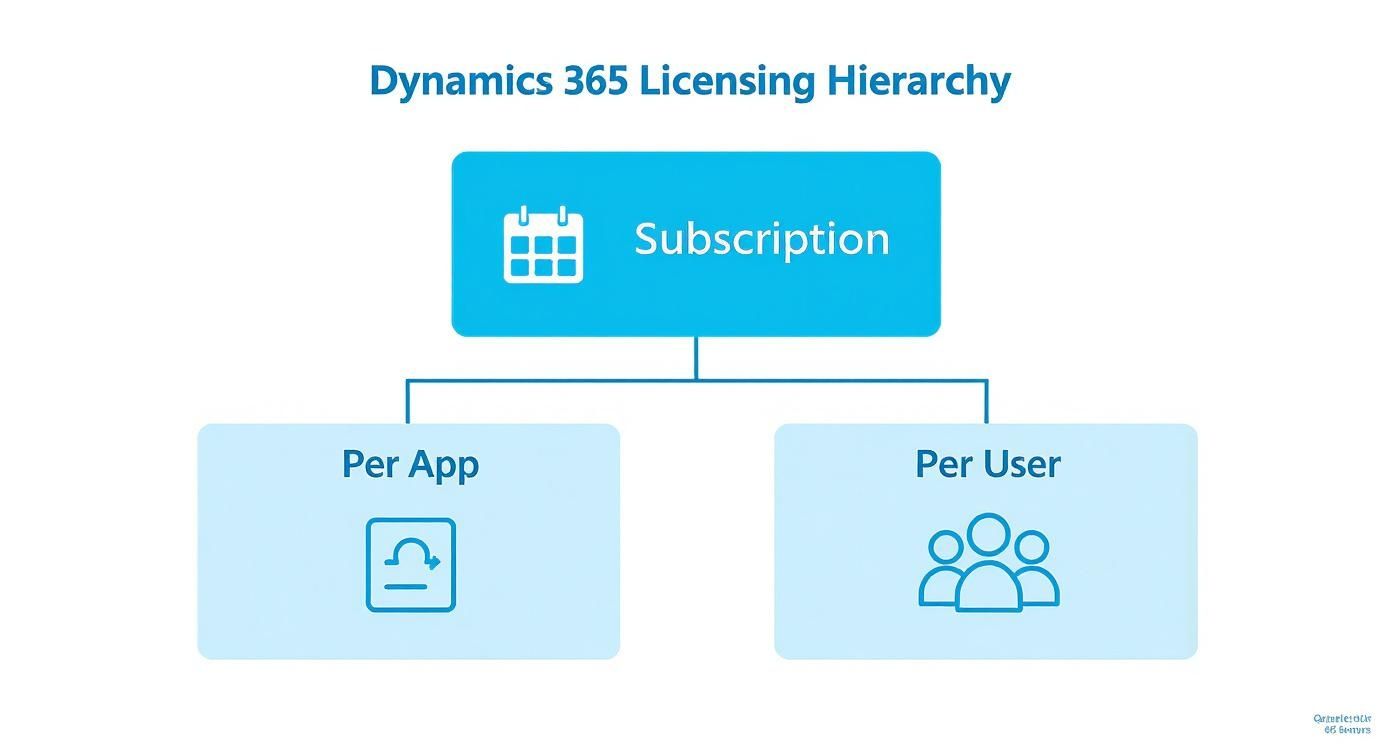
Every licensing decision starts with the core choice between a per-app or per-user model. That decision shapes your overall cost and flexibility.
Exploring the CRM Application Suite
The CRM family focuses on the customer journey. These apps help you attract new customers, win their business, and keep them satisfied. Current 2026 list prices follow each app.
- Dynamics 365 Sales: Your core sales engine for managing leads, tracking opportunities, and closing deals. It comes in Sales Professional at $65 per user/month for smaller teams, Sales Enterprise at $105 per user/month for organizations needing deep customization and forecasting, and Sales Premium at $150 per user/month for AI-driven seller guidance.
- Dynamics 365 Customer Service: Everything support teams need to deliver strong service, manage cases, and run a shared knowledge base. It runs Professional at $50 per user/month, Enterprise at $105 per user/month, and Premium at $195 per user/month.
- Dynamics 365 Customer Insights: The marketing and data engine. It runs multi-channel campaigns, builds customer journeys, nurtures leads to sales-readiness, and unifies customer data for analysis.
- Dynamics 365 Field Service: For businesses with field personnel, this app handles scheduling, dispatches technicians, and tracks work orders. The full license is $105 per user/month, with a Contractor license at $50 per user/month.
These applications form the heart of any customer-first strategy. To see how they integrate into one system, learn more about expert Dynamics 365 services that align technology with business goals.
Understanding the ERP Application Suite
While CRM looks outward at your customers, ERP applications run your internal operations. They manage finance, accounting, manufacturing, and supply chain logistics.
The ERP landscape in Dynamics 365 centers on two product families:
- Dynamics 365 Business Central: An all-in-one solution for small to medium-sized businesses. It combines finance, sales, service, and operations in a single application. Essentials runs $80 per user/month and Premium runs $110 per user/month.
- Dynamics 365 Finance and Supply Chain Management: Separate, robust applications for large enterprises with complex, often global, operations. Finance handles advanced accounting, budgeting, and reporting. Supply Chain Management manages inventory, warehousing, and logistics. Each runs $210 per user/month, with Premium tiers at $300 per user/month.
You do not need to buy every application. The power of Dynamics 365 comes from selecting only the modules that solve your problems or unlock new growth.
Full Users vs. Team Members
Across both CRM and ERP suites, Microsoft offers two distinct user license types. Understanding the difference is one of the most effective tactics for controlling your Microsoft Dynamics 365 pricing.
Full User: For people whose daily job runs on Dynamics 365. Salespeople creating quotes, accountants closing books, warehouse managers tracking inventory. They need full read-write access to create, edit, and approve records. These are your power users, and they hold licenses like Sales Enterprise or Business Central Premium.
Team Member: A low-cost license at $8 per user/month, built for light use. It fits employees who mostly consume data rather than create it. An executive viewing a dashboard, an employee submitting a timesheet, a project manager updating task status. Team Members have limited write access. They cannot run core business processes, but they get the visibility they need.
Assigning a full license to someone who only views reports is like buying a premium gym membership for someone who uses the treadmill once a month. By auditing each person's needs and deploying Team Member licenses where they fit, companies cut monthly software spend by 30 to 50 percent without sacrificing productivity.
What the Recent Price Changes Mean for Your Budget
Understanding today's Microsoft Dynamics 365 pricing is only half the equation. You also need the context behind the current figures. After years of stable costs, Microsoft raised prices to reflect heavy investment in cloud infrastructure and AI capabilities.
Powerful new features keep arriving, from Copilot-driven insights to tighter Power Platform integration. If you want a refresher on past updates, review our guide on how to prepare for Dynamics 365 release waves. The current pricing aligns cost with this added value.
The 2024 and 2025 Price Increases Are Now in Effect
Microsoft raised Dynamics 365 prices in two separate rounds. Enterprise applications including Sales Enterprise, Customer Service Enterprise, Finance, and Supply Chain Management increased on October 1, 2024, the first increase for those apps in more than five years. Business Central pricing increased separately, with new Essentials and Premium rates effective November 1, 2025, the first Business Central increase in more than five years.
The figures throughout this guide reflect those current rates. Business Central Essentials moved to $80 per user/month, and the enterprise Finance and Supply Chain Management apps now sit at $210 per user/month. For Microsoft's own reference, the current terms live in the Dynamics 365 Business Central pricing page. With the increase already absorbed into list pricing, the work now is right-sizing your subscription against it.
How to Optimize Around Current Rates
You can still treat your renewal as a chance to optimize spend and secure better long-term value. A strategic approach turns a routine renewal into a catalyst for efficiency.
Three practical strategies to consider:
- Lock In Multi-Year Terms: Signing a multi-year agreement gives you predictable costs and shields you from future increases. Three-year commitments are available through partners.
- Audit Your Licenses: Scrutinize who holds which license. Are there licenses on former employees? Are some team members on a full Enterprise license when a Team Member license would do? Eliminating waste is the fastest way to cut your bill.
- Consult a Microsoft Partner: A reputable partner knows Microsoft's licensing rules and often has access to pricing programs and promotions not on the public list.
The key is to be proactive. Waiting until renewal is imminent means missing the opportunity. Planning now lets you refine your license strategy, cut inefficiencies, and keep your Dynamics 365 investment lean.
A partner can analyze your usage data and build a business case for the most cost-effective licensing model for your team. This is about actively managing your technology spend for the best return.
Calculating Your True Total Cost of Ownership
The monthly license fee is the tip of the iceberg. To understand the full cost of a Dynamics 365 deployment, calculate the Total Cost of Ownership (TCO). That means accounting for every service, support plan, and tool the platform needs to work for your business.
Think of it like buying a high-performance engine. The engine is powerful, but it is not a car. You still need a chassis, wheels, and a skilled mechanic. The full power of Dynamics 365 is unlocked only when it is implemented correctly, your team is trained, and it is managed well over time.

Unpacking Implementation Services
The largest cost outside monthly licenses is the implementation itself. This is the hands-on work of configuring the system to fit your business processes. A successful implementation is not just activating software. It is a project with several critical phases.
The process typically includes:
- Discovery and Planning: Aligning on scope, goals, and technical requirements.
- System Configuration: Setting up modules, defining user roles, and configuring security permissions.
- Data Migration: Transferring data from legacy systems into Dynamics 365 without errors.
- Customization and Integration: Tailoring the platform to your workflows and connecting it to other essential software.
- User Training: Equipping your team to use the new system effectively.
The complexity of these tasks drives the final price. Industry data shows a wide range, with deployments running from $15,000 to over $1,000,000 in 2026. A simpler out-of-the-box setup for Sales or Customer Service sits at the lower end. A large multi-department enterprise project commands a much larger budget. As a planning rule, first-year TCO often lands at three to five times your annual licensing spend.
Planning for Ongoing Expenses
Your TCO calculation does not end at go-live. Ongoing expenses are a permanent part of the budget that keep your platform healthy and effective for years.
Key ongoing costs to include:
- Support and Managed Services: Most companies take a support plan from their Microsoft Partner for troubleshooting, updates, and maintenance.
- Third-Party Apps: Microsoft AppSource offers thousands of specialized add-ons. Many add real value, and many carry their own subscription fees.
- Continuous Improvement: Your business will evolve, and your system must adapt. Smart planning budgets for future modifications, customizations, and training for new hires.
A well-planned implementation is not a one-time expense. It is the foundation for long-term success. Overlooking ongoing costs like support and training is a common mistake that leads to poor adoption and a lower return.
The Role of a Microsoft Partner
Navigating these costs alone is hard. That is why an experienced Microsoft Partner matters. A good partner builds a realistic TCO model from the start, flags potential pitfalls, suggests cost-effective solutions, and keeps your project on budget.
Their expertise also ensures the system is designed correctly from day one, saving you from expensive rework later. To understand the partnership, learn more about the Microsoft Dynamics 365 implementation journey in our article. Identifying every cost up front lets you build a predictable budget and set your project up for success.
Real-World Pricing Scenarios by Industry
Price lists and license types give you a framework, but real examples show how Microsoft Dynamics 365 pricing works in practice. Here are three scenarios that show how different companies build a solution to fit their needs and budget. All licensing estimates use current 2026 list prices.
By examining their challenges, license mix, and cost structure, you can picture a similar setup for your own organization.
Scenario 1: A Growing E-commerce Company
An online retailer is growing fast, and its systems cannot keep up. The customer service team lacks order history, marketing emails are generic, and inventory lives in a spreadsheet. They need a unified platform.
The Solution:
- Base Licenses: The sales team gets Dynamics 365 Sales Enterprise at $105 per user/month to track leads and close deals. The support team gets Dynamics 365 Customer Service Enterprise at $105 per user/month for case management and a full customer view.
- Attach Licenses: For cross-team visibility, sales reps add a Customer Service attach and service reps add a Sales attach at the $20 per user/month rate.
- Team Member Licenses: Warehouse staff and leadership get Team Member licenses at $8 per user/month, enough to view dashboards and make basic updates.
Sample Cost Breakdown:
- Monthly Licensing Estimate: Between $3,500 and $5,500, depending on the final user count.
- Initial Implementation Range: $40,000 to $75,000. This covers system setup, data migration from their old CRM, and integration with their e-commerce platform.
Scenario 2: A Mid-Sized Manufacturing Firm
This manufacturer faces production bottlenecks from poor supply chain visibility. Its legacy ERP makes it hard to forecast demand, manage the warehouse, or close the books. They need a modern ERP to connect the factory floor with the finance office.
The Solution:
- Base Licenses: Dynamics 365 Supply Chain Management at $210 per user/month fits operations staff, including production planners and warehouse managers. The accounting team gets Dynamics 365 Finance at $210 per user/month as their base.
- Attach Licenses: Senior managers who need both operations and finance add the other application as a $30 attach instead of a second full license.
- Team Member Licenses: Factory floor workers use Team Member licenses to log time and update production orders. Sales reps use them to check inventory before committing to customers.
By using attach licenses for managers, the firm avoids paying full price for two enterprise applications per person. That gives complete visibility while keeping monthly costs manageable.
Sample Cost Breakdown:
- Monthly Licensing Estimate: $9,000 to $14,000, typical for robust ERP applications.
- Initial Implementation Range: $150,000 to $300,000. The higher cost reflects configuring manufacturing workflows, migrating historical financial data, and training a large team. This principle applies across specialized fields. For instance, learn about the benefits of CRM for the automotive industry in our detailed guide.
Scenario 3: A Professional Services Organization
A consulting firm cannot pin down project profitability. It juggles project plans in spreadsheets and client information in a separate CRM, which leaves data siloed and resources misallocated.
The Solution:
- Base Licenses: Dynamics 365 Project Operations at $135 per user/month fits, since it combines sales, project management, and financials in one solution. It becomes the base for all project managers and partners.
- Team Member Licenses: Consultants get Team Member licenses to enter timesheets, update tasks, and submit expenses. The executive team uses them for a high-level view of project health and financials.
Sample Cost Breakdown:
- Monthly Licensing Estimate: $6,000 to $9,000, driven mostly by the Project Operations license.
- Initial Implementation Range: $70,000 to $120,000. This budget covers project templates, integration with their accounting software, and training the team on the streamlined process.
Smart Strategies to Optimize Your D365 Spend
Understanding the parts of your Microsoft Dynamics 365 pricing is the first step. The real work begins when you actively manage that investment to maximize value. With proactive thinking, you achieve meaningful savings without hurting your team's effectiveness.
This is not about being cheap. It is about being strategic. A few key practices turn your Dynamics 365 subscription from a fixed cost into a flexible asset that scales with your business. Here are practical strategies you can use immediately.
Conduct Regular License Audits
One of the most effective ways to control costs is a regular license audit. Treat it as routine maintenance for your software budget. Over time, people change roles, projects start, and employees leave, often stranding expensive, unused licenses.
A quarterly or semi-annual review surfaces these opportunities fast. Look for:
- Inactive Users: Licenses on former employees or people who have not logged in for months. These are easy wins to unassign or reallocate.
- Mismatched Roles: Someone on a full Enterprise license who only views reports is a perfect candidate for an $8 Team Member license. Right-sizing access is a major cost-saver.
Maximize the Power of Attach Licenses
We covered the base and attach model, but its role in cost savings deserves repeating. Many organizations miss it and buy multiple full-price base licenses for one person who works across departments. This is a common, avoidable error.
Always start your licensing discussion with one question: does this user already hold a qualifying base license? If yes, adding a second or third application as an attach is far cheaper. Giving a user with a base Sales license access to Customer Service costs $20 instead of a second $105 license.
Partnering with an expert who knows Microsoft's licensing rules is the surest way to build a cost-effective plan. They identify every chance to use attach licenses, so you get the most functionality for the lowest price.
Partner with an Expert for Better Pricing
Working with a Microsoft Partner may be the single most important decision for optimizing spend. These partners are not just implementation specialists. They are strategic advisors in Microsoft's complex licensing world.
They often have access to promotions, pricing programs, and discounts you will not find on your own. A good partner analyzes your needs and builds a license mix that fits your goals and budget, preventing overspend from day one. Their expertise means you are not just buying software. You are making a smart, long-term investment. This guidance is critical for managing total cost of ownership and ensuring project success.
Got Questions? We've Got Answers
When exploring Microsoft Dynamics 365 pricing, a few questions come up every time. Here are answers to the most frequent ones to give you clarity and help you decide.
What's the Real Difference Between a Base and an Attach License?
Think of it like a combo meal versus ordering à la carte. Your base license is the main course, the first and highest-priced application you buy for a user at full price. It is the foundation.
An attach license is the side dish at a lower price. Once a user has a base license, say Dynamics 365 Sales, you add other apps they need, like Customer Service, for $20 to $30 per user/month. This makes it affordable to give your team access to multiple D365 tools without blowing the budget.
Are There Discounts for Non-Profits or Schools?
Yes, and they are substantial. Microsoft supports non-profit and educational organizations with significant discounts on Dynamics 365.
To qualify, your organization must be validated by Microsoft as an eligible non-profit or educational institution. We recommend working with a Microsoft Partner experienced in these sectors. They know the validation process and make sure you receive every discount you are entitled to.
This is not a minor discount. It is a deliberate move by Microsoft to make powerful business tools accessible to organizations with limited budgets, so schools and non-profits operate efficiently without enterprise-level costs.
Can I Really Mix and Match Different Dynamics 365 Apps?
Absolutely. The platform is designed for it. Modularity is one of the greatest strengths of Dynamics 365. You are not just allowed to build a custom-fit solution, you are encouraged to.
You can start with a single application, like Dynamics 365 Sales, and add Finance or Customer Insights as your company grows. Every application is built to work together, and the base-and-attach model rewards this mix-and-match approach.
How Does a Microsoft Partner Actually Affect the Price I Pay?
Engaging a Microsoft Partner is almost always the most financially sound decision when buying Dynamics 365. They are licensing experts who design a plan so you do not pay for any user or feature you do not need.
Partners often have access to promotions and pricing not available directly from Microsoft. Their real value lies in implementation expertise. A good partner controls your project costs and ensures a successful deployment, which lowers your total cost of ownership and secures long-term value from your investment.
Ready to build a Dynamics 365 plan that fits your budget and drives real growth? The experts at Twelverays can design a tailored solution that maximizes your ROI. Contact us today to get started.


