
An auto dealer CRM is the system of record for every lead, test drive, trade-in, and service visit a dealership generates, and the engine that drives the next action on each of them. A dealership CRM only earns its budget when it is wired into how the sales floor actually works. Most crm software for dealerships gets sold on a feature list, then gets used as a static filing cabinet because nobody does that wiring. The guide below compares dealer crm software platform by platform and covers the AI, DMS integration, and pricing decisions that determine whether car dealer CRM software pays for itself.
Key Takeaways
- Auto dealer CRM software is the system of record for every lead, test drive, and service reminder a dealership generates, and it only pays off when reps actually keep it updated.
- Dealership CRM systems are only as good as the records reps enter, so most failures trace back to manual data entry rather than the platform itself.
- Automotive retail CRM is different from a generic sales CRM because it models vehicles, trade-ins, service history, and DMS inventory data alongside the standard contact record.
- AI-powered automotive CRM is worth the switch when it handles initial lead qualification, predictive service outreach, and multi-channel follow-up without adding headcount.
- DMS integration is the difference between quoting a vehicle that is actually in stock and pitching one that already sold, which is why real-time sync matters more than feature count.
- The best crm software for car dealerships is the platform that matches your sales process, your rooftop count, and your DMS, not the one with the longest feature list.
Dealer CRM Software: Common Features for Dealerships
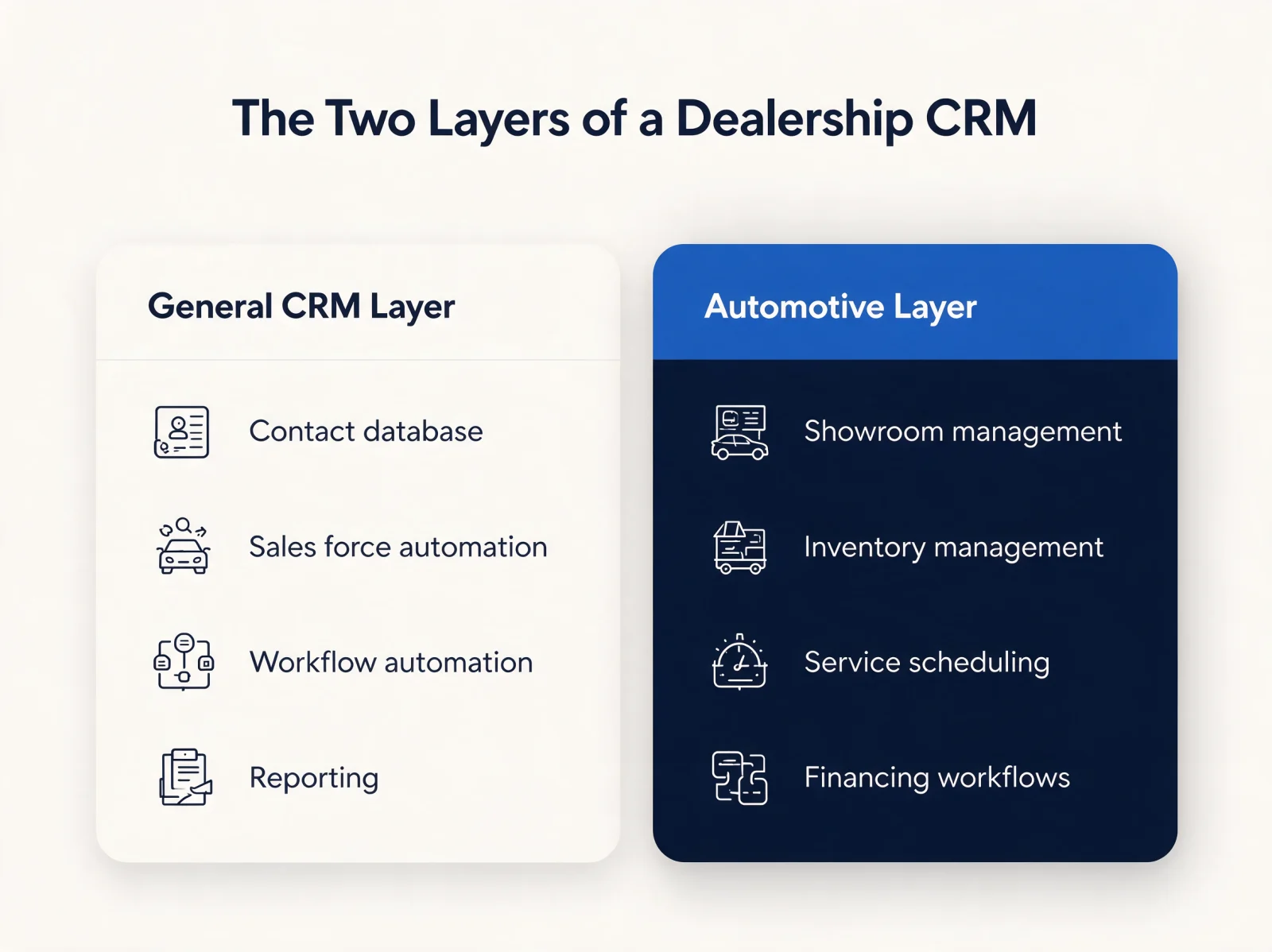
Dealer crm software splits into two layers: the general CRM functions every industry uses, and the automotive-specific functions built for how a dealership actually sells and services vehicles.
The general layer of crm software for dealerships covers a contact database, sales force automation, interaction tracking, workflow automation, and reporting, the same backbone any B2B CRM ships with. The automotive-specific layer is what separates a dealership CRM systems build from a generic install: showroom management, inventory management, lease management, service department scheduling, a mobile app for the sales floor, financing workflows, and email integration tied to the deal record.
Showroom management is the automotive feature that logs walk-ins, test drives, and desk logs against the same customer record the online lead created, so the up-log and the CRM stop disagreeing. Done right, this combination automates repetitive follow-up, surfaces missed deals before they go cold, improves call quality tracking, and manages the customer relationship across the full vehicle life cycle instead of stopping at the sale. Done poorly, it is the same static filing cabinet with automotive-flavored field names.
Best CRM Software for Car Dealerships: Automotive Dealer CRM Platforms Compared
No single automotive dealer CRM wins on every dimension. The best crm software for car dealerships depends on dealer group size, sales model, and how much of the DMS relationship you want built in.
| Platform | Best Fit | Signature Capability | Trade-Off |
|---|---|---|---|
| DealerSocket | Franchise dealer groups | Combined CRM, DMS, and equity mining in one suite | No free trial or plan |
| LivePerson Automotive | High online-shopping volume | Real-time live chat across the sales funnel and post-purchase service | Feature set limited to chat-based engagement |
| Selly Automotive | Independent, BHPH, and RV dealers | Automated 24/7 lead response and follow-up, with texts, calls, and emails in one platform | High notification volume can overwhelm reps |
| Pro Max | Dealerships prioritizing service | Strategic, operative, and collaborative CRM layered with website and inventory tools | Limited display customization |
| Autoraptor | Lean, all-in-one teams | Scheduling, reminders, and smart filters tied to performance insights | Mobile app feature set is thin |
| Izmocars | OEM-franchised dealers and groups | Lead management plus customer database marketing, with an account view spanning sales, parts, and service | Custom reporting runs on a Crystal Reports engine |
| VinSolutions | Groups prioritizing data security | Desking, inventory, and marketing tied to one CRM record | Onboarding and training support lag the platform |
The automotive dealer CRM platforms compared above cover the packaged end of the market. Enterprise builds on Dynamics 365 or Salesforce sit alongside them and are covered further down, under pricing and rollout.
For deeper dives on specific platforms and concepts, see The Benefits of CRM for the Automotive Industry, Automotive CRM Systems, What Is Salesforce Used For?, and 10 CRM Implementation Steps for Company Success.
Why Automotive Retail CRM Falls Short Without DMS Integration
Automotive retail CRM only works as well as the data flowing into it, and without a tight connection to the Dealer Management System, that data is almost always incomplete.
DMS vs. CRM: What Each System Owns
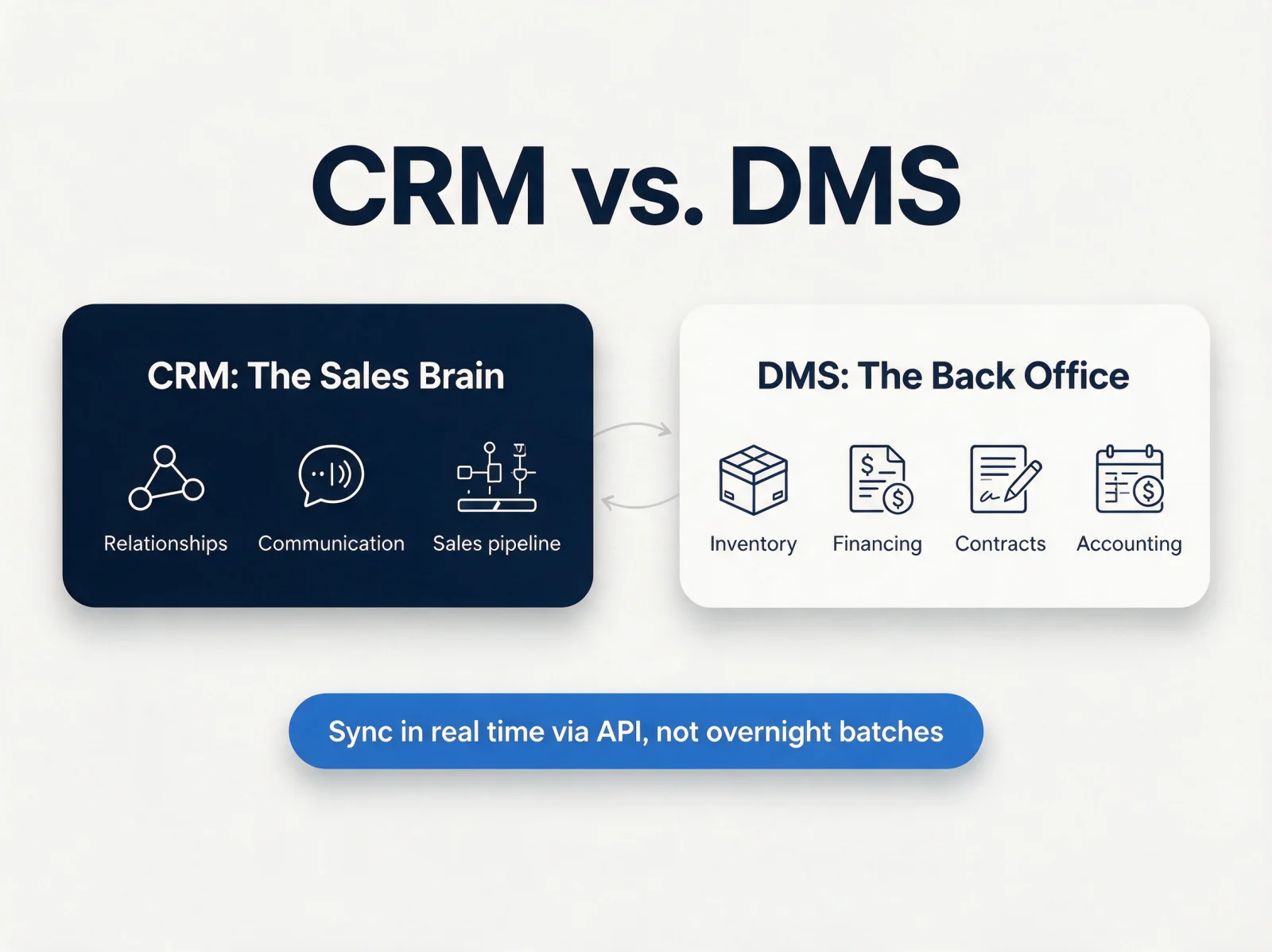
A dealership CRM is the sales brain: it manages relationships, communication, and the pipeline. A Dealer Management System is the operational back office: inventory, financing, contracts, and accounting. When the two do not talk in real time, reps end up pitching vehicles that are already sold, in transit, or not on the lot. It is the same category split covered in CRM vs. ERP: What's the Difference?, just with a dealership-specific back office standing in for a general ERP.
What a Complete Customer View Includes
A complete customer view is a single record that carries every signal a dealership already collects, across both systems. Five data streams have to land on that record:
- Website behavior: pages visited, vehicles configured, lead forms submitted.
- Showroom interactions: which rep engaged the customer, test drives taken, deals presented.
- Service history: appointments scheduled, repairs completed, upsells accepted or declined.
- Marketing engagement: emails opened, offers redeemed, campaign attribution by source.
- Finance and trade data: loan terms, equity position, trade-in history.
Miss any one of them and the automation downstream fires on a partial picture. That is how a service customer with negative equity gets a generic newsletter instead of a trade offer.
AI Solutions for Real-Time Data Sync With Automotive DMS
Pro Tip: Before buying any car dealer CRM software, confirm whether inventory and deal data sync through a certified API connection or a flat-file import. API-based integrations push updates in near real time. Batch imports, even hourly ones, leave a window where inventory looks available after it has already sold.
A buyer who has spent two days researching one trim level should not arrive at the dealership to learn the vehicle is gone, information the CRM never received because the inventory feed only runs overnight. Newer AI solutions for real-time data sync with an automotive DMS watch the feed itself: they flag records that fail to match between systems and reconcile duplicate customer entries automatically instead of waiting for a quarterly cleanup. Clean data migration is the other half of this problem: see 8 Data Migration Best Practices for 2026 for the checklist to run before any CRM cutover.
AI-Powered Automotive CRM: Lead Routing, Predictive Service, and Follow-Up
AI-powered automotive CRM turns a contact database into an engine that qualifies, predicts, and follows up without waiting on a rep to remember.
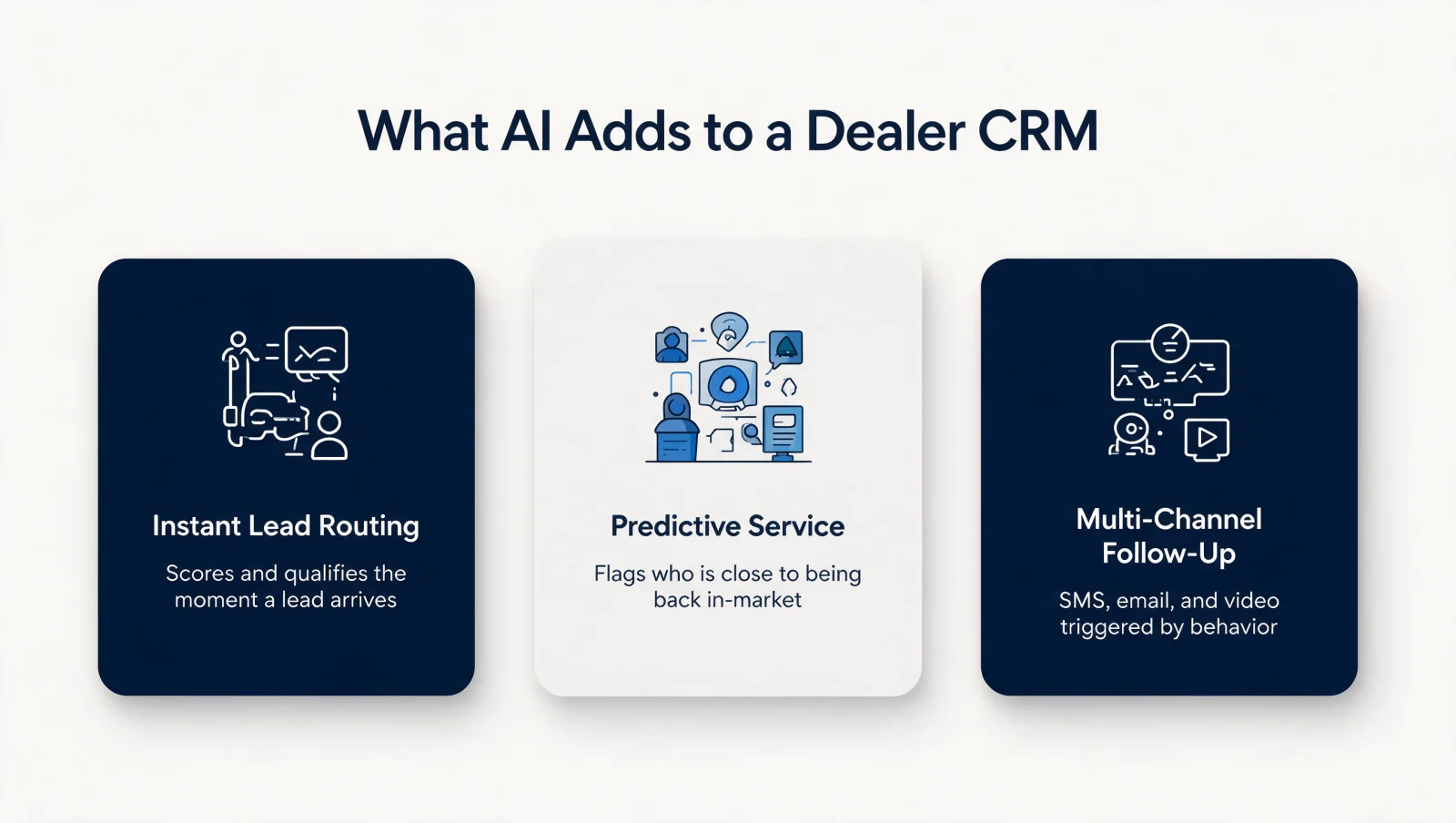
Legacy lead management leaves money on the table. The gap between a lead arriving and a human responding can cost the deal outright, and AI agents close that gap by scoring inbound leads and asking pre-set discovery questions the moment they arrive, routing only sales-ready prospects to the floor.
Predictive service outreach is the CRM analyzing service history, mileage, and financing terms to flag who is statistically close to being back in-market, before that customer starts browsing. Three signals surface the best trade-conversation candidates: negative equity reversal, where the loan balance has dropped under market value; high-mileage thresholds approaching a warranty or lease boundary; and repeat-repair patterns on an aging vehicle.
Multi-channel follow-up compounds the advantage. Automated SMS, email, and video messaging can run in parallel, triggered by customer behavior instead of a rep's memory. McKinsey's research on sales automation found efficiency improvements of 10 to 15 percent and sales-uplift potential of up to 10 percent from automating tasks that used to sit on a rep's desk, and estimates that about a third of all sales tasks can be automated with current technology. For more on where this fits inside a broader strategy, read AI-Powered CRM: What It Is and Why You Need One and AI Agents for CRM.
Buyers already shop this way. Cox Automotive's 2025 Car Buyer Journey Study found 63% of vehicle buyers prefer blending online and in-person steps, and 25% of new-vehicle buyers already used AI tools while shopping. A dealership CRM that cannot meet those buyers in-channel loses the deal.
None of this happens in a vacuum. Gartner tracked the worldwide CRM software market growing 13.4% to $107.5 billion in 2023, with Salesforce, Oracle, and Microsoft holding the top three market-share positions, and its 2024 edition puts the market at $128 billion. Salesforce's own 2026 State of Sales research found 94% of sales leaders using AI agents call them essential to meeting business demand. Every dealership is choosing a platform inside a market that keeps investing more, not less, in exactly this kind of automation.
How to Choose a Dealership CRM: Pricing and Rollout
Dealership CRM pricing follows two models: automotive-specific platforms sell a monthly subscription per rooftop, tiered by user count and messaging volume, while enterprise builds on Dynamics 365, Salesforce, or HubSpot price per user plus a one-time implementation.
The subscription route gets a single store live fast and keeps the vendor responsible for DMS connectors. The enterprise route costs more upfront but owns the customization ceiling: custom desking workflows, multi-rooftop lead routing, and reporting that packaged auto dealer CRM tools cannot match. Independent dealers start on the subscription model; dealer groups adding rooftops outgrow it.
Rollout discipline matters more than the platform choice. Run the selection in this order:
- Audit your lead sources and map every one to a routing rule before signing anything.
- Confirm certified, API-based integration for your specific DMS, not a vague "integrates with most systems."
- Pilot with one sales team for 30 days and measure lead response time, not login counts.
- Tie CRM hygiene to pay plans so records stay complete after the trainer leaves.
Auto Dealer CRM FAQs
What is the best CRM for car dealership operations?
The best crm for car dealership operations is the one your DMS integrates with cleanly and your reps will actually update daily. Packaged automotive platforms win on speed to launch for a single rooftop. Configured Dynamics 365 or Salesforce builds win for dealer groups that need custom desking, multi-rooftop routing, and reporting across stores.
What is the difference between a dealership CRM and a DMS?
A dealership CRM manages leads, follow-up, and the sales pipeline; a DMS runs inventory, financing, contracts, and accounting. A dealership needs both, connected through a real-time API integration, so reps only quote vehicles that are actually on the lot.
Is an AI-powered CRM worth it for an independent dealer?
Yes. An AI-powered CRM for an independent dealer answers after-hours leads, qualifies them with discovery questions, and books appointments without adding headcount. That matters most where one manager covers sales, financing, and marketing, because response speed slips first.
How long does an auto dealer CRM implementation take?
Packaged automotive CRMs go live in 2 to 6 weeks. A configured Dynamics 365, Salesforce, or HubSpot build takes 2 to 4 months depending on DMS integration scope, data migration volume, and how many rooftops share the instance. Plan for adoption work after go-live: a CRM is implemented when reps use it daily, not when the vendor closes the ticket.
How Twelverays Builds Automotive Dealer CRM Systems on Dynamics 365, Salesforce, and HubSpot
Automotive dealer CRM work at Twelverays means configuring Dynamics 365, Salesforce, or HubSpot around how a dealership actually sells and services vehicles, not installing a generic CRM and hoping the sales floor adapts to it.
Twelverays' Dynamics 365 team builds lead-routing rules that assign an inbound lead to the right rep by source, vehicle interest, and response-time SLA the moment it lands, so a lead never sits in a shared inbox waiting for someone to notice it. The same discipline applies on Salesforce: Sales Cloud and Service Cloud configured to route deals and service tickets by rooftop, with Marketing Cloud Account Engagement running the automated service-reminder and repeat-buyer sequences that turn a one-time sale into a multi-year relationship. On HubSpot, the same pattern runs through Sales Hub and Marketing Hub for dealer groups that want a lighter-weight platform without losing workflow automation.
The centralization problem is not unique to automotive. Twelverays has unified CRM data across a multi-location franchise group, moving it from siloed per-location records to one real-time system covering every location the group operates. Multi-rooftop dealer groups face the identical architecture problem: a lead captured at one store should never be invisible to another, and the fix is the same one franchise operators need, a single CRM instance with the DMS data layered underneath it, not a separate spreadsheet per rooftop.
Picking the right CRM auto platform starts with matching the software to your sales process, not the feature list. If your team is choosing between the two most common enterprise routes, Dynamics 365 vs. Salesforce: How to Choose and Dynamics 365 vs. HubSpot: How to Choose both walk through the trade-offs before you sign a contract, and either path benefits from the same discovery step: audit the DMS integration and lead-routing rules before configuring anything else. If your current stack cannot answer those two questions today, a scoped CRM audit is where to start, not a full re-platform.


