

Human in the loop AI is an operating arrangement in which people review information or authorize specified actions within an AI workflow. If an agent must wait for approval before changing a record or sending a message, the implementation scope should define who reviews the request, what they see, and what happens when they reject it or do not respond.
A promise of “human oversight” is too broad to price or test. Buyers need an approval queue with specific behavior: requests arrive, authorized reviewers inspect the proposed action, decisions are recorded, and the system proceeds only under the agreed conditions.
A human in the loop workflow needs a review queue, an action boundary, and an owner who can handle exceptions. Use this guide when a proposed AI agent needs employee approval and you want to compare what implementation partners will deliver.
Key takeaways for human in the loop AI buyers
Before choosing an implementation proposal, require a demonstration that:
- The assigned reviewer can inspect the proposed action and its source context.
- Approval authorizes only the shown action and version.
- Rejection, expiry, and withdrawal prevent the action from executing.
- Changed inputs or permissions trigger the agreed revalidation or review.
- A named owner can handle delays, inspect failures, and pause or resume the workflow.
List the decisions that require a person
Begin with one action the agent may propose. In a hypothetical sales-operations workflow, an agent drafts an update to a CRM opportunity after reviewing approved notes. The account owner must approve the proposed changes before the system writes them. This is a scoping example, not a reported customer implementation.
Specify the boundary in ordinary business terms. The agent can prepare a proposed next step and explain its source. It cannot change the opportunity amount, contact another person, or add a new action merely because the reviewer approved the next-step field.
Then identify the person authorized to make that decision. The right reviewer may depend on record ownership, department, or the type of action. A shared inbox can receive notifications, but the system still needs a rule for determining who can approve the request.
According to the 2023 NIST AI Risk Management Framework (AI RMF 1.0), human roles in decision-making and AI oversight need to be clearly defined and differentiated. In this project, those roles need to become permissions and operating instructions that employees can use.
Distinguish reviewing information from authorizing an action. A person might correct a customer name without approving the proposed CRM update. The interface and action record should make that distinction clear.
Twelverays' AI operations design is a relevant starting point for defining these responsibilities. Bring the proposed action and the current decision owner to the scoping discussion.
Specify the approval queue in the project scope
An approval queue holds proposed actions awaiting review, with an assigned reviewer and recorded status for each request. Each request should contain enough context for a decision. For the CRM example, that includes the current record, the proposed changes, the source notes, the reason for the proposal, and any missing information the agent identified.
Ask the supplier to demonstrate the review experience with an example from your agreed scope. A notification that says “approve this update” leaves the reviewer dependent on information elsewhere. Decide which details must be visible and which supporting records they can open under their normal access permissions.
Use a behavior table to compare proposals. The following is an original scoping format, with buyer decisions still to be agreed for the actual project.
| Event or condition | Behavior to specify | Evidence the owner should receive |
|---|---|---|
| New proposal | Create a request for the authorized reviewer | Proposed action, source context and request version |
| Approval | Authorize the specific action shown | Reviewer identity, decision time and approved version |
| Rejection | Prevent the proposed action and record the decision | Rejection reason and resulting request status |
| Reviewer edit | Show what changed and require the appropriate decision | Original proposal, revised proposal and approval history |
| No response | Follow the agreed holding or escalation rule | Age, owner and escalation record |
| Expired request | Prevent use of the expired approval request | Expiration status and the next permitted step |
| Changed input | Recheck the proposal before acting | Difference found and whether another review is required |
| Failed action | Preserve the result and route recovery to its owner | Attempt, observed response and recovery status |
Keep the statuses understandable. A reviewer should be able to tell whether a request is awaiting a decision, approved but not executed, completed, rejected, or awaiting investigation. The exact labels can vary; the underlying distinctions need to survive.
For one platform example, Microsoft's request-information action pauses an agent flow, collects input from designated reviewers, and makes their responses available to subsequent steps. That capability illustrates part of the process. The supplier must still show how its proposed implementation handles the specific decision and action boundary you need.
Microsoft's documented limits matter when comparing scope: the action sends requests through Outlook, accepts the first person's response, and cannot send requests outside the tenant. If your process requires two approvers or an external customer, ask the supplier to demonstrate that requirement separately.
Plan for delays and unavailable reviewers
An approval queue creates work for employees. Estimate that work during discovery and measure it in the pilot. Include time spent opening supporting records, correcting a proposal, resolving ambiguity, and dealing with exceptions.
For illustration, 20 requests a day at three minutes of review each would require 60 minutes of handling time. Those numbers are hypothetical inputs, not a staffing benchmark. They also exclude waiting, interruptions, and more difficult cases. Use your team's observations before deciding what volume the process can support.
Set an owner for aging requests. If the account owner is away, the queue needs a permitted alternative: delegation, escalation to another authorized person, or holding the request until the owner returns. A reminder alone does not establish who can make the decision.
Specify business hours and timezones where they affect routing or deadlines. A request created late on Friday can remain pending much longer than one created early on Tuesday. Decide whether that difference is acceptable for the action being proposed.
Approval expiry is the point after which an approval request can no longer authorize execution. Choose an expiration rule appropriate to the information. A recommendation based on a changing opportunity record can become stale while it waits. The supplier should explain when it will withdraw the request, refresh the proposal, or ask for another review.
Avoid treating silence as approval unless the business has explicitly authorized that behavior for the defined action. If the proposed workflow requires a person's decision, its timeout path should preserve that boundary.
Workflow automation covers the routing, notifications, and handoffs around the agent. Include these operating details in the quote so they are tested as part of the delivered workflow.
Test approvals when the inputs change
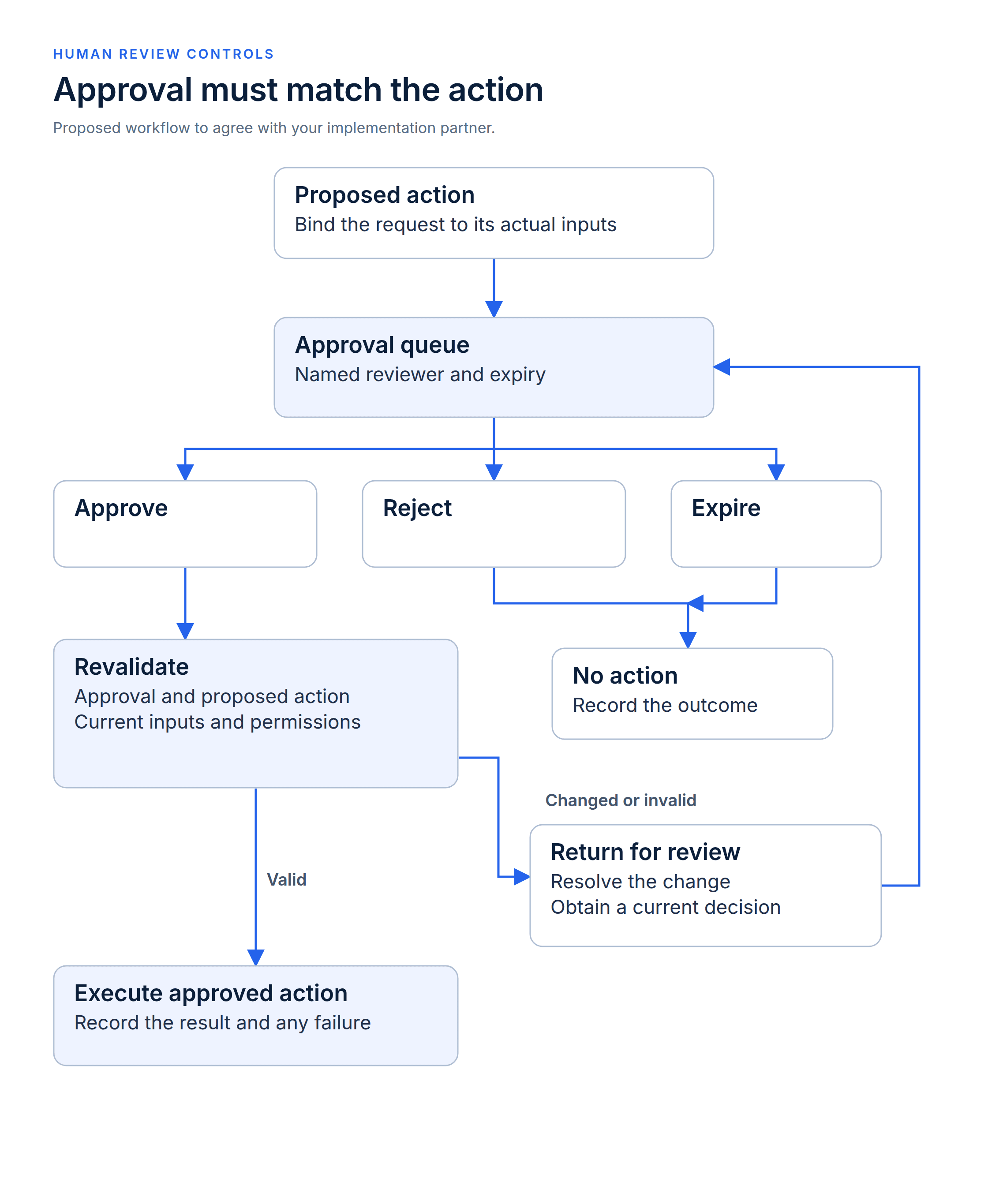
Revalidate approval, the proposed action, current inputs and permissions before execution. Return changed requests for review.
Approval should apply to the action the reviewer saw. If the relevant input changes before execution, the system needs to check whether the approved action is still valid.
In the hypothetical CRM workflow, the owner approves a next-step update. Before the agent writes it, another employee changes that field. Blindly applying the earlier update could overwrite the newer decision. The scope should state how the implementation detects and handles this conflict.
The response might be to stop, show the new value, and request another review. A different action might permit a narrower revalidation without changing the approved proposal. Agree the behavior for the actual workflow; do not leave the supplier to infer it from a generic approval requirement.
Also test changes to the reviewer. An employee may approve a request and then lose the relevant access before execution. Ask which permissions the system checks when it acts, and what happens if it cannot establish the authority required for that action.
Include duplicate submissions and uncertain results. If a reviewer clicks twice, or the connected system times out after accepting the change, the implementation should follow the agreed recovery behavior. The owner needs to know whether the action happened before authorizing another attempt.
Approval revocation withdraws permission before execution. Specify how an authorized reviewer can withdraw approval before the action executes. If the action has already completed, its correction or reversal needs a separate, explicitly authorized process. The queue should show which situation applies.
When a paused workflow resumes, recheck the pending requests against current inputs and permissions before allowing actions to continue. A pause should not preserve an approval that has become invalid.
A rejected or expired request should not silently return to an executable state. If the workflow creates a revised request, show what changed and require the decision that applies to the revision. Keep the history connected so the reviewer can see the previous concern.
These cases make useful acceptance demonstrations. Ask the supplier to run them with controlled data and show the request history, the connected-system result, and the remaining owner action. A screenshot of an approval button cannot establish the behavior of the complete process.
Put operational ownership in the handoff
Your team needs a named owner for the queue after deployment. That person should know how to inspect pending requests, identify failed actions, pause the workflow, and obtain help for a case that cannot be resolved through the normal process.
Ask for the approval rules and configuration in an accessible handoff record. Include role assignments, delegation rules, expiration behavior, notification destinations, and the process for changing them. Keep version history for the approval configuration, including who authorized each change. Confirm which changes your team can make and which require the implementation partner.
Access to history matters too. Decide who can inspect source context, reviewer decisions, and execution records, and how long those records should be retained under your organization's requirements. An approval history can contain sensitive business information; broad access is not necessary for every employee.
Review proposed rule changes before applying them. Expanding the allowed fields, adding a recipient, or changing an escalation route can alter the authority exercised by the workflow. The change process should identify the owner who approves it and the tests that demonstrate the intended result.
Separate ongoing support from the initial build when comparing prices. Ask what monitoring, investigation, reviewer training, and configuration maintenance the supplier includes. Confirm the support terms for your engagement rather than assuming that the presence of a queue includes continuous operational coverage.
Twelverays' AI agent services can be scoped around the agent's role and human handoffs. The approval process should be discussed as part of that operating design, with the customer's responsibilities recorded alongside the supplier's work.
Compare human-review workflow proposals
Give each bidder the same proposed action and the same difficult cases. Ask them to show how the reviewer sees the request, how a decision binds to an action, and how the owner handles delays or failures.
Compare the complete work involved: system access, review interface, routing, approval history, connected actions, exception handling, acceptance testing, and handoff. Mark exclusions explicitly. A proposal for notifications alone describes a smaller scope than a proposal covering approval and controlled execution.
Buyer FAQs about human in the loop AI
Does human-in-the-loop AI mean every output needs approval?
No. The owner defines where review is required for the workflow. A draft internal suggestion can have different handling from an action that changes a shared record. The implementation should preserve the agreed boundaries rather than apply one review rule to everything.
Does human review guarantee data accuracy?
No. A reviewer still needs the relevant sources, enough time to inspect them, and a way to reject or correct the proposal. During the pilot, test whether the reviewer can identify a deliberately incorrect proposal before it reaches execution.
What should happen when the reviewer does not respond?
Choose a holding, expiry, or escalation rule and name its owner. If a human decision is required, a missed response should not quietly authorize the action. Test the selected behavior before the workflow is accepted.
Can employees edit actions in a human in the loop workflow?
They can if that capability is included in scope. Specify which parts they may change, whether the revised action needs another approval, and how the system records the original and revised versions. Editing context and authorizing execution are separate decisions.
What should we bring to an implementation discussion?
Bring one action that needs approval, the person who approves it today, a sample of the supporting information, and an example of a delayed or disputed request. Scope your approval workflow with Twelverays around the decisions your team is authorized and equipped to make.


