

Scope a Google Ads Salesforce integration around the sales events you can define, validate, and maintain. Salesforce offline conversion tracking needs reliable source records and a supported connection method. Before approving a Google Ads CRM conversion import, ask the supplier to document which events qualify, how records reach Google, and what evidence will show that the connection works.
The buying decision is larger than connecting two accounts. You are agreeing on a measurement process across advertising, the website, Salesforce, and the people who maintain them. A successful connection should make its exclusions and failures visible as well as its accepted records.
Key takeaways
- Confirm the current Salesforce connection method and its prerequisites before accepting a quote.
- Define an event using a business condition, source record, event time, and destination conversion action.
- Test identifier preservation through the Salesforce paths your team actually uses.
- Reconcile source events, imported rows, and attributed conversions separately.
- Approve reporting validation before changing campaign bidding goals.
What a Google Ads Salesforce integration includes
A Google Ads Salesforce integration transfers selected CRM outcomes into Google Ads for conversion measurement and, where configured, campaign optimization. The scope should name the connection, Salesforce objects, conversion actions, required data, schedule, and operating owner.
Google's legacy Salesforce integration stopped receiving support on May 31, 2025. The replacement experience manages connections through Data Manager. Google's Salesforce migration FAQ also explains that the newer integration separates connections by Salesforce object, such as Lead or Opportunity. A proposal copied from the old Salesforce-tab workflow needs a current review.
Require the supplier to inspect your actual configuration. An existing connection, a third-party connector, and a custom implementation can have different permissions, operating costs, and support responsibilities. Record the supported route in the scope and attach the applicable documentation. A working login alone does not establish that the proposed event can be imported.
For stakeholders new to the dependency, the CRM integration overview explains why field mapping and operational ownership belong in the same project.
Write the Google Ads CRM conversion import event contract
An event contract is a written definition of the business outcome to be transferred and the data needed to represent it. Start with a small set of outcomes that sales can explain consistently.
For example, your team might choose a qualified lead and a won opportunity. Those are separate decisions. State whether a qualification event means initial acceptance, a completed discovery call, or another observable condition. Do not rely on a label that different teams interpret differently.
| Contract item | Buyer decision | Evidence to request |
|---|---|---|
| Event condition | Which change makes the record eligible? | Reviewed Salesforce field and value |
| Source object | Does the event belong to a Lead or Opportunity? | Object and relationship map |
| Event time | When did the qualifying change occur? | Trace to the source history or approved timestamp |
| Match data | Which supported identifiers or customer data are available? | Redacted mapping and eligibility checks |
| Destination | Which conversion action receives the event? | Account and action identifiers |
| Value | What does the number represent? | Written value and currency rules |
| Repetition | What happens if the same event is processed again? | Duplicate and retry test results |
These are procurement requirements, not suggested Salesforce field names. Ask the implementer to use your actual schema. A sample custom field in a proposal does not prove that the field exists, is populated, or survives record conversion.
Agree how changes are approved. If sales later renames a stage or changes qualification criteria, the integration owner needs to assess the effect before reporting definitions drift.
Verify Salesforce lead conversion mapping
Salesforce lead conversion mapping determines how the information required by your chosen measurement route continues through the records your team uses. Inspect the real paths, including converted leads, opportunities created directly, and records linked to existing contacts or accounts where applicable.
Google's current Salesforce setup guidance describes support for user-provided data or Google Click Identifier join keys. For the click-ID approach, it includes a custom-field mapping from Lead to Opportunity and field-history requirements. It also explains that the standard integration can derive conversion time from the qualifying field change. These details need to match the selected route and your configuration.
Do not assume that a CRM campaign field is a Google click identifier. Likewise, a missing GCLID is not enough to reject every possible measurement approach. Ask which supported method applies, what data it needs, and how eligibility is checked.
The mapping review should cover each relevant intake route: website forms, intermediate form tools, manual creation, and other approved sources. Trace a redacted example across the route. Record where values can be changed, dropped, or overwritten.
Use the Salesforce data migration checklist when a broader cleanup or migration is also planned. Keep that work separately priced if it exceeds the conversion integration.
Preserve meaning as well as values
An opportunity's current status does not explain when it first met a condition. A forecast close date may also differ from the timestamp of a stage transition. Ask the supplier to demonstrate the chosen source of event time and how it handles time zones.
Use a repeatable event reference for operational tracing. Do not treat a click identifier as the unique identity of every later business outcome. A lead qualification and a subsequent sale may need separate definitions even when they relate to the same acquisition journey.
Set boundaries for Google Ads opportunity feedback
Google Ads opportunity feedback is the selected opportunity information returned for advertising measurement. Decide what the feedback is intended to support before assigning values to it.
Opportunity amount, expected revenue, booked revenue, and cash received describe different things. Ask finance and sales to approve the value definition used by the integration. Record how currency, missing amounts, and subsequent corrections are handled. Do not label a forecast as recognized revenue.
Also decide which outcomes are for observation and which can influence bidding. Google's primary and secondary conversion guidance ties primary actions to the standard goals used by campaigns. Secondary actions normally serve observation, but actions included in a custom goal can still be used for bidding. Inspect the actual campaign goals during acceptance.
If several events represent stages of one journey, review the risk of optimizing toward unintended combinations. Record the approved goal configuration and require authorization for changes. Upload acceptance and bidding readiness are separate approval decisions.
Loss reasons can help your internal analysis without automatically becoming positive advertising conversion goals. Describe any proposed use of lost or disqualified records explicitly, including whether those records stay in CRM reporting.
Use Salesforce conversion reconciliation to explain differences
Salesforce conversion reconciliation compares the agreed source events with downstream processing and advertising reports. It should explain where records went and why totals differ.
Ask for three separate views:
- Source population: Records meeting the agreed Salesforce condition during the chosen period.
- Import results: Records selected, excluded, submitted, accepted, or rejected by the connection.
- Advertising results: Conversions reported under the relevant action, attribution settings, and reporting dates.
Google's Salesforce setup documentation distinguishes a valid imported row from a conversion that appears in advertising reports. An accepted import does not establish that the record belongs to an eligible Google advertising interaction. Request a reconciliation sample before treating a difference as a fault.
For each view, record the filters, date basis, time zone, and expected processing delay. Use the same documented comparison when reviewing a later incident. A raw CRM total and a campaign report are not automatically comparable.
The marketing attribution guide provides context for the reporting discussion. Attribution assigns credit under a defined method; it does not independently prove the incremental sales caused by advertising.
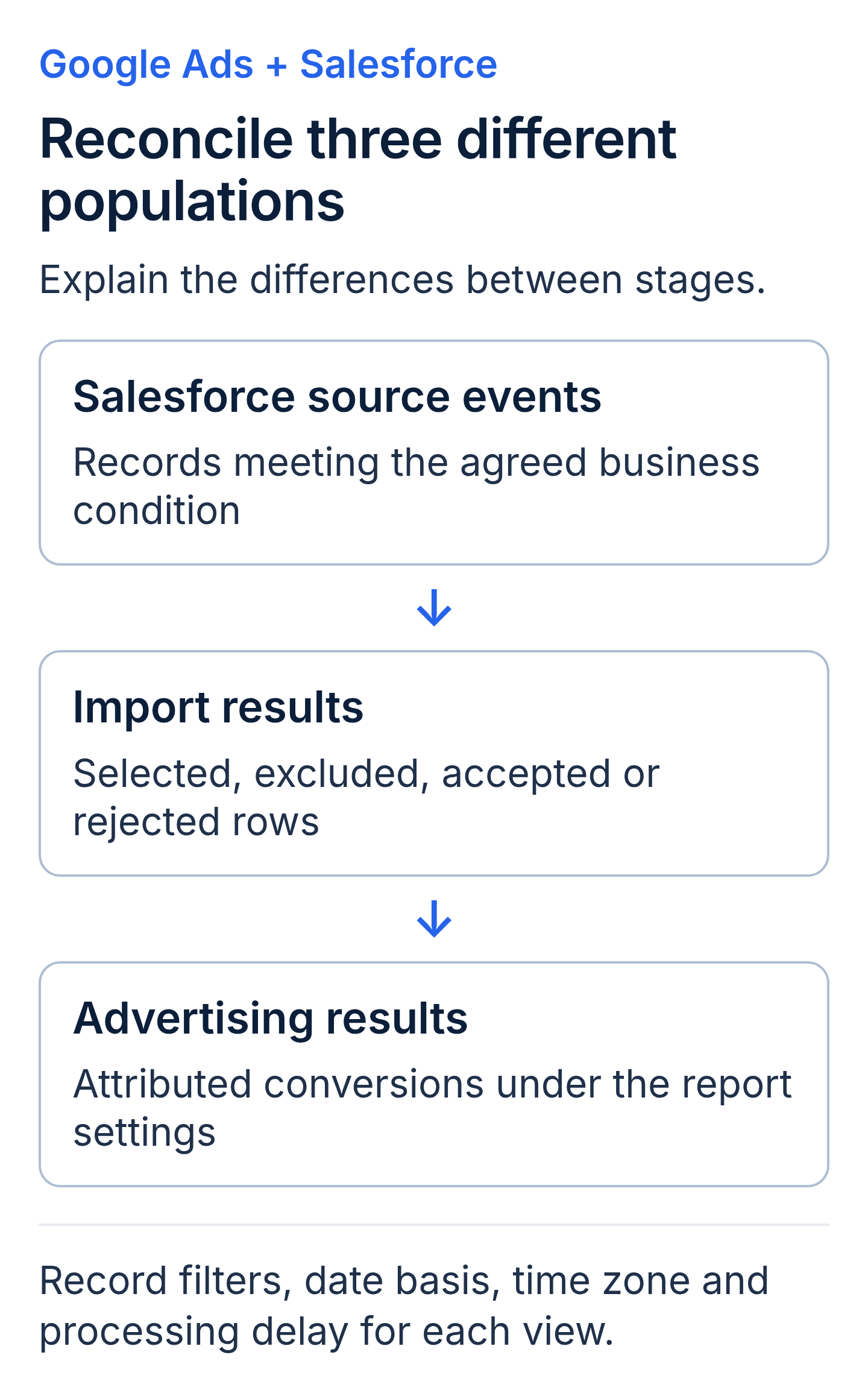
Import acceptance does not establish advertising attribution. Review the source population, connection results and advertising reports as separate evidence, with aligned definitions.
Put acceptance tests in the statement of work
Ask the supplier to propose a controlled test plan with the Salesforce owner and advertising owner. Separate tests of data transport from tests of actual conversion eligibility. Synthetic identifiers can help check field transport in an isolated test, but they do not demonstrate a real attributable conversion.
| Test case | Required evidence |
|---|---|
| Eligible agreed event | Trace from source record through import result to the appropriate report |
| Missing required data | Clear exclusion or error and an assigned resolution path |
| Non-qualifying record | Evidence that the selection rule excludes it |
| Repeat processing | Recorded behavior without an unintended additional event |
| Stage reversal or correction | Documented treatment under the approved event definition |
| Connection interruption | Alert, recovery procedure, and authorized replay decision |
| Unmatched accepted row | Explanation of import acceptance versus report eligibility |
Use approved records and environments. Keep artificial conversions out of production bidding signals. Where a connector lacks an isolated test environment, agree on a controlled alternative and its limitations before execution.
Have the supplier state the applicable import windows and historical-data restrictions for the chosen method. Do not accept a universal backfill promise. Require evidence that the needed history and identifiers exist before pricing historical recovery as a deliverable.
Compare implementation scope and ongoing responsibility
Separate discovery, website changes, Salesforce configuration, connection setup, validation, and ongoing support in the quote. Ask which licensing, connector subscriptions, access approvals, and internal resources are prerequisites.
Name the person responsible for failed runs and the person authorized to change event definitions. Set an agreed review cadence for imports and reconciliation. A dashboard without an owner can leave a broken process unexplained.
Request these handover artifacts: the final mapping, event definitions, connection inventory, permission record, test results, reporting filters, and recovery instructions. Document where credentials are managed without placing secrets in the handover file.
Use an acceptance meeting to review one representative event and one exception from start to finish. Record outstanding limitations and the party responsible for each. A clear limitation can be managed; an unexplained difference cannot be signed off confidently.
Glossary for integration buyers
- CRM: Customer relationship management system, the source of the sales records in this project.
- GCLID: Google Click Identifier, a click identifier used by supported Google Ads measurement methods.
- Offline conversion: An eligible outcome recorded outside the immediate website interaction and imported for measurement.
- Conversion action: The defined customer activity tracked in Google Ads.
- Data Manager: Google's interface for connecting and managing eligible external data sources.
- Event contract: The agreed condition, data, timing, and destination that define an imported outcome.
- Reconciliation: A documented comparison that explains records across source, import, and reporting stages.
- Idempotency: Processing the same intended event again without creating an unintended additional result.
Buyer questions
Does every Salesforce record need a GCLID?
No single identifier rule covers every supported route. Google's current Salesforce guidance describes click-ID and user-provided-data approaches. Have the supplier identify the selected method, required data, and applicable policies before deciding which records qualify.
Should imported conversions exactly match Salesforce totals?
Only compare populations with aligned definitions. CRM events, accepted imports, and attributed advertising conversions represent different stages. Require an explanation of exclusions, errors, matching, date basis, and reporting delay.
When should imported outcomes be used for bidding?
After the authorized owners review event quality, goal configuration, and reporting evidence. Ask the advertising team to explain the proposed transition and monitoring plan. A successful connection alone does not establish that a particular outcome is suitable for campaign optimization.
Discuss the advertising requirements through Twelverays' paid search services. Contact Twelverays with your Salesforce record paths, current connection method, and desired sales events to discuss an implementation scope.


