

Zapier consulting is scoped help to assess, implement or repair business workflows using Zapier. A Zapier automation audit should identify which handoffs need attention and what evidence would prove a repair works. If you also need Zapier workflow support, define the workflows covered, the person responsible for failures and the documentation your team will retain before choosing a provider.
Start with one unreliable business handoff. For example, a sales inquiry reaches a form but does not reliably become an assigned record in the customer relationship management (CRM) system. The buying decision is whether to repair that route, simplify it or commission a replacement with clear acceptance conditions.
Twelverays offers workflow automation services. The questions below help an operations manager turn a recurring problem into a delivery scope that can be quoted and reviewed.
Give a Zapier consultant a process to assess
A Zap is a workflow in Zapier that starts with a trigger and runs configured action steps. Buying a workflow begins with defining the business result and the records that need to reach it.
Use a hypothetical form-to-CRM handoff to build the scope. Identify the source form, required fields, qualification checks, record owner, destination and confirmation. Write down what should happen when an inquiry already exists, contains incomplete information or requires a person's decision.
Collect a small set of sanitized examples: one successful handoff, one missing record and one duplicate. Show the expected result for each. Remove personal information and credentials from material shared during the initial discussion.
Ask the consultant to review whether the existing applications can perform the required handoff through their native features. Keep approval or interpretation steps manual where the business has not agreed reliable rules. A useful assessment should explain its recommendation and the dependencies behind it.
If platform fit remains unresolved, use our Zapier alternatives guide for the separate platform decision. Require the implementation proposal to name the selected route, the supported process and its exclusions.
Define the output of a Zapier automation audit
An audit should give the buyer enough evidence to decide what work to authorize. Agree the workflows being inspected and the records the reviewer needs. Distinguish findings supported by run history from questions that still require access or a controlled test.
Request a short findings register with the symptom, business consequence, suspected cause, evidence and recommended next action. A finding such as "duplicate lead records" needs the affected step and a reproducible example. The proposed repair needs its own acceptance condition.
Ask the provider to separate immediate repairs from changes to the process itself. Correcting a field mapping and redesigning sales assignment are different scopes, with different people needed for approval.
Use AI workflow audit services as background if the wider process also involves artificial intelligence (AI). Keep the Zapier assignment tied to the specific handoff you are buying. Do not add an AI component without an identified purpose, review owner and accepted behavior.
Price Zapier implementation services using explicit assumptions
Separate the consultant's fee from Zapier subscriptions and charges from connected applications. Ask for the account plan, estimate date, expected volume and feature assumptions used in the quote. Record the currency for a United States or Canadian purchase.
Zapier's task-usage documentation, checked in September 2026, ties task consumption to successful billable actions. Triggers and polling checks do not use tasks. Failed or unexecuted actions do not count, and some built-in steps and products have separate rules. One workflow run therefore does not necessarily equal one task.
Consider an explicitly hypothetical estimate: 100 events each complete two ordinary actions billed at one task per action. That produces 200 tasks before other billable activity. The estimate changes if events take different branches, actions have different billing rules or successful actions run again during replay. It is arithmetic for a proposed design, not a plan price or a client result.
Ask for these inputs beside the estimate:
- Expected events and their source, including any seasonal or campaign-driven changes.
- Actions that execute on each branch and the billing rules used for them.
- Connected-application limits, required permissions and paid features.
- Recovery assumptions and the person who reviews actual task consumption.
Compare observed usage with the estimate during acceptance. Put plan upgrades, excess usage and new branches through a defined approval process. The provider should explain any uncertainty before the customer accepts a recurring cost assumption.
Agree how failed and partial runs will be repaired
Partial completion means some steps succeeded before a later step failed or stopped. Recovery needs to account for work already performed, such as creating a record or sending a message.
Zapier's replay documentation distinguishes replaying errored steps from replaying an entire run. In its failed-step example, the previously successful action is skipped. A full replay starts a new run using the current published workflow and repeats previously successful actions. Those successful actions count toward task usage again.
Ask the consultant to identify the recovery method for each failure scenario. Document how the process checks for an existing record before repeating a write. Do not accept "we will replay it" as sufficient evidence that duplicate records or repeated messages are controlled.
Use the following scenarios as acceptance tests for the agreed workflow:
| Scenario | Business behavior to agree | Evidence to request |
|---|---|---|
| A required field is missing | Hold or route the inquiry for a named person's review | The missing field is visible and the record is recoverable |
| The same event arrives again | Follow the agreed duplicate-handling rule | The resulting records match the defined business rule |
| A destination field changes | Expose the failed mapping and prevent silent loss | A test shows the alert and recovery route |
| An app connection expires | Notify the access owner and document reconnection | The owner can identify the affected connection and resume safely |
| A destination is unavailable | Retain enough evidence to reconcile the interrupted work | Source and destination records can be compared |
| An early action succeeds and a later one fails | Recover the remaining work without unreviewed repetition | A partial-run test identifies existing and repeated actions |
Agree these tests before implementation, then record expected and observed results. Use controlled records rather than triggering customer-facing messages as an informal test.
Zapier does not guarantee a replay will succeed. Its documentation includes task-capacity, connection and workflow-change restrictions, plus a 60-day replay limit. Ask the provider to confirm which recovery features the actual plan supports. Define what happens when replay is unavailable or the source information has changed.
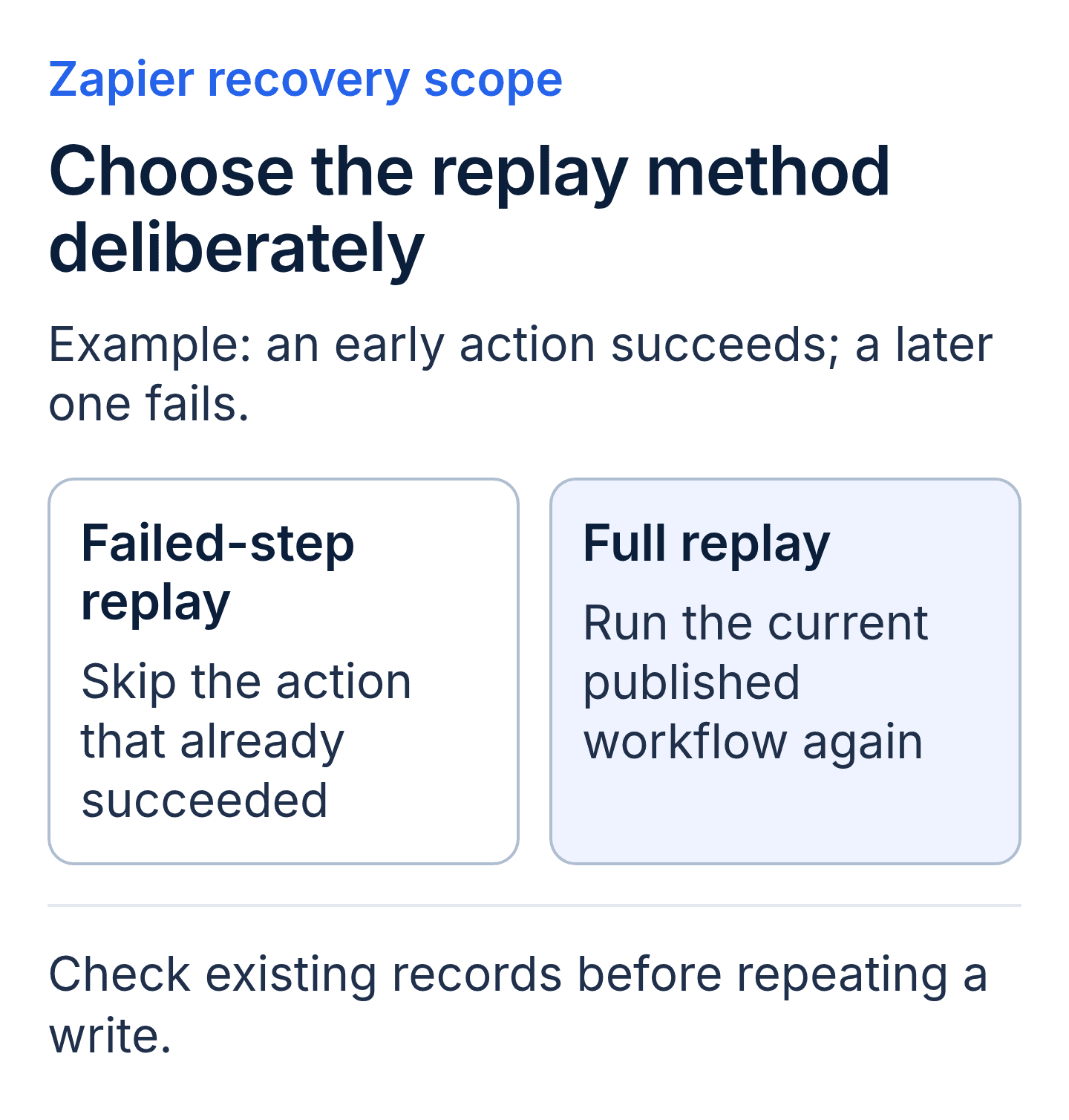
For a partially completed run, confirm which replay method is available. Test repeated actions and account for tasks consumed again by successful actions in a full replay.
Check permissions before approving a handover
Require an inventory of the Zapier account, workflow owners, app connections and underlying connected accounts. Identify who can approve access, repair credentials and remove a departing provider. Use the narrowest access that supports the agreed work.
Zapier's shared-connection guidance describes sharing and ownership transfer within Team or Enterprise accounts. Transferring a connection's owner leaves the underlying connected account unchanged. That distinction matters when a workflow was built using a consultant's account in another application.
Sharing a connection can allow people to access or update information without showing them the login credentials. Review the resulting data and action access before granting it. Do not equate hidden credentials with permission to expose every record available through the connection.
The same documentation states that a published workflow pauses if its owner loses access to a connection it uses. Test the intended customer's ownership and connection access before removing provider access. Agree a sequence for the change and a check that the supported handoff still works afterward.
If the required ownership model cannot be supported in the proposed setup, revisit the design. Our n8n vs make vs Zapier comparison provides platform context; the contract still needs a specific access arrangement for this engagement.
Separate remediation from Zapier workflow support
A repair engagement should end with a verified correction and an accepted record of the work. A new implementation needs the agreed process map, configuration, tests and deployment evidence. Recurring support requires a separate definition of the workflows maintained and the events that trigger action.
| Engagement | Completion or review evidence | Boundary to settle |
|---|---|---|
| Repair an existing workflow | Reproduced issue, documented change and passing acceptance tests | Whether unrelated defects or process redesign are included |
| Implement a bounded workflow | Approved map, tested behavior and customer acceptance | Number of destinations, branches and customer dependencies |
| Maintain supported workflows | Reviewed incidents, change records and usage checks | Coverage hours, response commitments and excluded new work |
Name the people responsible for receiving alerts, reviewing failures and making business decisions. Ask what happens when that person is absent. Distinguish an acknowledgment target from a promised resolution time; the latter depends on the failure and the access available.
A new field, application or branch can change both behavior and cost. Require an assessment of the change before it is added to the supported scope. Keep the customer responsible for timely decisions where the provider cannot choose the business rule.
Require a usable Zapier automation handover
A runbook is a practical operating guide for the person who maintains the workflow. It should identify the normal result, the alert route, the recovery steps and the point where a business owner must decide.
Request a workflow map, field definitions, connection inventory, test results, known limitations and change history. Record where these materials will live and who can access them. Include the task estimate and the assumptions that would require it to be reviewed.
Make the final acceptance exercise a customer walkthrough. The intended owner should locate a run, interpret its result and explain how an unresolved error is escalated. Record outstanding issues with an owner and next action before closing the engagement.
Buyer glossary
| Term | Meaning | Proposal evidence |
|---|---|---|
| Trigger | The event that starts the workflow | Source event and qualifying conditions |
| Action | A configured operation performed by the workflow | Destination, fields and expected result |
| Task | A unit consumed under Zapier's billable-action rules | Dated estimate with applicable exceptions |
| Branch | A route selected using stated conditions | Rules and tests for each supported route |
| Replay | Re-execution of an eligible run or its failed steps | Chosen method and duplicate-handling checks |
| App connection | Authorized access to a connected application account | Account identity, owner and permission review |
| Reconciliation | Comparing source and destination records to find discrepancies | A check that identifies missing or repeated work |
| Runbook | Instructions for operating and recovering the workflow | An accessible guide tested by the intended owner |
Zapier consulting buyer FAQs
Can a consultant repair existing Zaps?
A repair scope can cover existing workflows when the provider has sufficient access and evidence to assess them. Request the reproduced issue, proposed correction and acceptance tests. Agree separately on any replacement or redesign.
Who pays platform charges?
The agreement should identify who pays Zapier and each connected application. Require the estimate and any upgrade assumptions separately from service fees. Confirm who approves changes and retains billing control after handover.
What should happen after a failed run?
The named owner should receive enough information to assess the business impact and choose the documented recovery route. Require reconciliation before repeating actions that can create duplicate records or messages.
What should remain when the consultant leaves?
Customer access to the agreed workflows and connections, current documentation, test evidence and an unresolved-issues record should be explicit deliverables. Verify the underlying app accounts as part of the handover, even when connection ownership has changed.
Key takeaways
- Commission a defined business handoff with observable acceptance tests.
- Estimate tasks from executed actions and documented billing rules, then check actual usage.
- Test partial completion and recovery before accepting the workflow.
- Verify customer access, underlying connections and operating documentation before provider access is removed.
Scope a Zapier workflow
Bring one workflow, sanitized examples of its failures and the business result you need to Twelverays. Identify the process owner and the applications involved. Book a discovery call to scope Zapier consulting with clear implementation, support and handover responsibilities.


