

Dynamics 365 Field Service implementation is the configuration of how service requests become scheduled work, how technicians complete it and how the business reviews the result. Your Dynamics Field Service implementation plan should follow those operational steps. A field service implementation scope defines the jobs, dispatch decisions, mobile conditions and acceptance evidence a partner will deliver.
Start with one representative work order and one difficult exception. For example, a proposed equipment repair may involve identifying the customer asset, assigning a qualified technician, recording work and parts, reviewing completion and preparing billing. A return visit for a missing part changes that journey and should appear in the requirements.
The buying decision is which behaviours the partner will deliver, how your team will test them and who will own the operation after launch. A feature demonstration helps explain possibilities, but the proposal needs to define your selected process.
Define the field service implementation scope around actual jobs
According to Microsoft's Field Service overview, the application includes work orders, scheduling, a technician mobile app, asset history, inventory and billing capabilities. Use that range to identify requirements, then confirm the capabilities and licenses selected for your environment. Product availability does not mean every capability belongs in your first release.
List the job types you intend to support, such as reactive repairs or scheduled maintenance. Record who receives requests, how priority is established and what information must be available before dispatch. Identify the customer commitments your process needs to support without turning them into unverified software response guarantees.
Describe territories, required skills, working hours, travel considerations and approval authority. Include subcontractors or shared equipment where relevant. Ask the partner to show which requirements can use the proposed configuration and which require another capability or a separate workstream.
Discuss those boundaries when evaluating Twelverays Dynamics 365 services. The Customer Engagement overview provides broader customer relationship management (CRM) context; this proposal should remain specific about field operations.
Build the Dynamics Field Service implementation plan around one work order
A work order is the record describing service work to be performed. A booking is the assignment of a resource and scheduled time to work. Keep those concepts separate when discussing status, completion and reporting. One work order may need more than one visit or resource assignment.
| Proposed stage | Required decision | Exception to test | Acceptance evidence |
|---|---|---|---|
| Intake | Customer, asset, issue and priority | Duplicate customer or uncertain asset | Correct work order and review owner |
| Scheduling | Resource, time and constraints | No suitable technician available | Approved booking or visible unresolved requirement |
| Travel and arrival | Required technician updates | Delay or incorrect site details | Agreed status and time information recorded |
| Onsite work | Tasks, parts and completion evidence | Missing part or additional work needed | Work and follow-up requirements recorded |
| Review and billing preparation | Approval and downstream responsibilities | Missing evidence or disputed work | Accepted record and agreed next action |
According to Microsoft's work order lifecycle guidance, work order system statuses and booking statuses represent distinct, related lifecycles. Their lifecycles influence each other. It also distinguishes Completed from Posted, with invoice and other processing affected by configuration. Do not collapse technician completion, supervisor approval and billing into one assumed status change.
Ask the partner to demonstrate a work order with multiple bookings and one unfinished visit. Decide what the dispatcher, technician and back office should see at each stage. Record the expected result so a status label does not conceal an unresolved operational handoff.
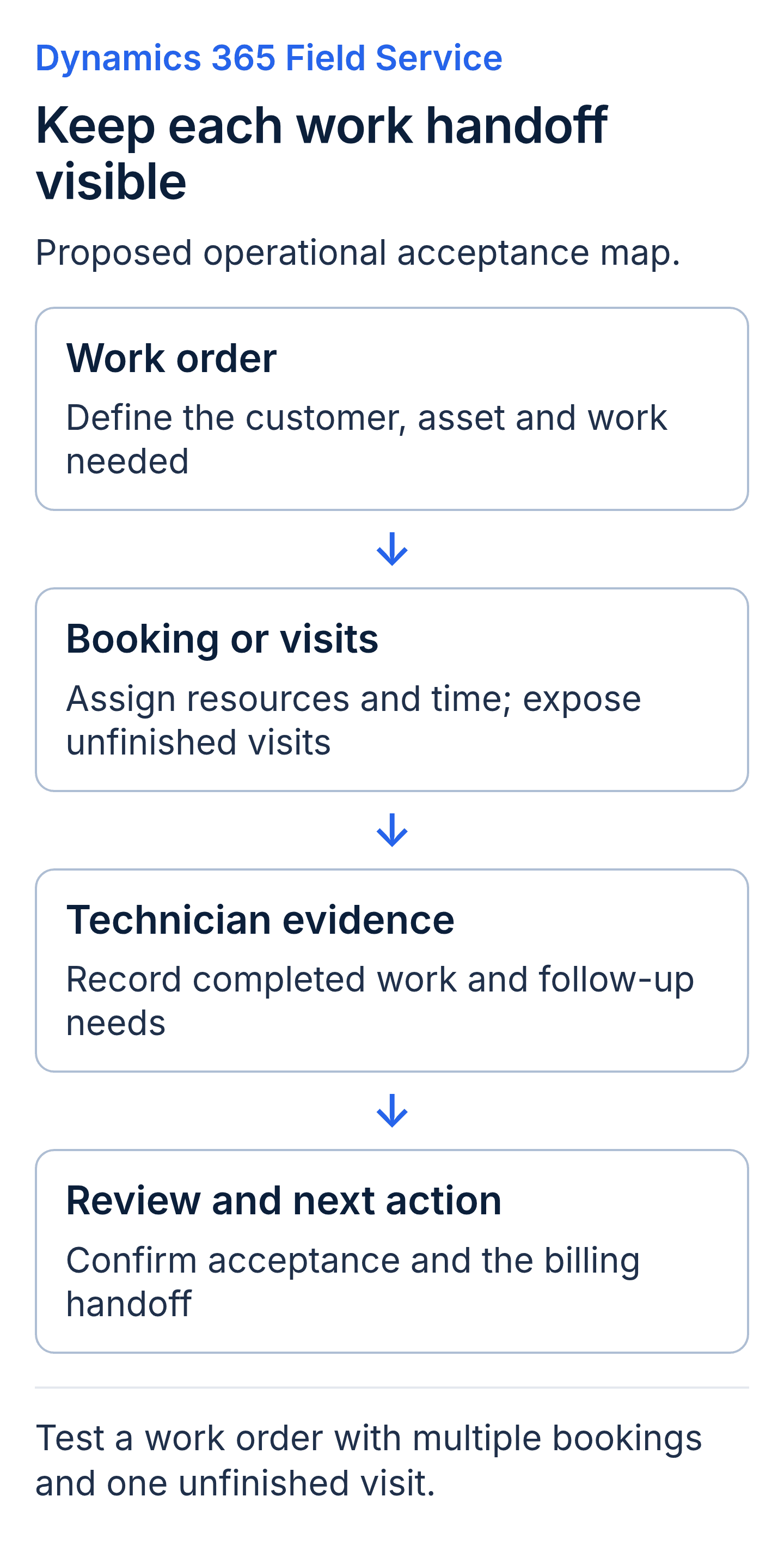
A proposed acceptance map. Keep the work order, bookings, technician completion and downstream review distinct in your tests.
Choose a Dynamics 365 Field Service implementation partner through dispatch scenarios
Give candidates the same scheduling requirements. Ask how they would handle an urgent request, a cancellation, an unavailable skill and work that needs a return visit. Identify which decisions stay with a dispatcher and which proposed assistance or automation is included.
Confirm any scheduling add-on and its commercial entitlement separately. A proposal should explain the selected method and its limits rather than referring broadly to an automated scheduling engine. Ask how a dispatcher can review, override or defer an assignment under the approved operating policy.
Test the effect on other work. Moving a technician to an urgent job may affect another customer's appointment. Define who authorises the change, how affected work is identified and which communications are expected. Do not assume the system sends every notification merely because a booking changes.
Include the availability of parts, access to the customer site and equipment requirements where they affect readiness. Decide whether the system must enforce a constraint, display a warning or rely on a documented human check. Those alternatives have different implementation effort and acceptance evidence.
Ask for the configuration decisions and operating instructions behind the demonstration. Your dispatch lead needs to understand how the agreed process can be maintained when territories, staff or service commitments change.
Specify mobile and offline work before approving configuration
List the devices, sign-in arrangements and connectivity conditions technicians will encounter. Define the customer details, asset history, instructions and completion evidence they need while away from a reliable connection. Then ask what data will be downloaded and which actions remain available under the proposed mobile setup.
According to Microsoft's offline synchronization guidance, offline operation depends on an offline profile and an initial data download. It also notes that network-dependent functions, including maps or Dataverse searches, may not work without connectivity. Do not interpret offline support as a promise that every feature remains available everywhere. Microsoft documents configurable sync intervals from 5 minutes to 1 day. Starting a sync still requires the app to be active and connected, so the selected interval alone does not guarantee when a dispatcher sees an offline update.
Test a technician starting with the required data, losing connectivity, recording the agreed work and reconnecting. Confirm the changes reach the server and that the dispatcher can see the intended result. Include how the technician recognises pending synchronization and who investigates an error.
The guidance describes conflict handling when device and server data disagree. Have the partner explain the configured policy and demonstrate a technician and dispatcher changing the same work order. Agree which result is acceptable and how an operator can identify a discrepancy.
Keep photo, signature and document requirements specific. Name what evidence is required, where it should be attached and how it will be retrieved for review. Verify the selected capability and offline behaviour rather than assuming that every evidence type works identically on every device.
Agree customer, asset, inventory and billing responsibilities
Create a data inventory covering customer identity, service locations, assets, products, relevant stock information and billing details. For each item, name the authoritative source, required values, matching method and owner. Separate initial preparation from recurring information exchange.
Field Service includes inventory and billing capabilities, as Microsoft's overview describes. That does not establish whether your organisation should use those capabilities, connect an existing system or retain an agreed manual handoff. Decide the operating design before calling all inventory or billing work an external integration.
For an existing finance or stock system, document the exact exchange required. A scope might include approved completion information sent to billing while leaving accounting configuration with another team. Name both sides of the handoff and the acceptance evidence. Do not expand a field service engagement into an unrequested finance or warehouse implementation.
Test a known customer and asset through the proposed process. Verify identity, service history and any required relationships. If a product or customer cannot be matched, define whether work pauses, a user reviews it or another approved process applies.
Review fees against these dependencies. The Dynamics 365 implementation cost guide provides broader budgeting context. For this quote, distinguish configuration, data preparation, connections, licenses, devices and ongoing support without assuming how any item is billed or accounted for.
Require Dynamics 365 Field Service acceptance testing with operating users
User acceptance testing (UAT) is the business team's check that the delivered setup meets agreed requirements. Include dispatchers, technicians and the people who review completed work. Technical testing remains necessary, but each operational role should assess the steps it will perform. According to Microsoft's Dataverse security role guidance, privileges are cumulative across assigned roles. Review the whole role combination when testing access, rather than assuming one restricted role cancels permissions granted by another.
Prepare expected results before running the trial. Include routine jobs and the exceptions that affect your operation: unavailable resources, missing parts, multiple visits, restricted records, interrupted connectivity and incomplete completion evidence. Use safe, representative data under the customer's approved procedures.
Follow the work through reporting and any billing handoff. A technician's completed task may still require supervisor review. Check that the appropriate role can see unfinished work and that downstream processing uses the agreed acceptance state. Compare selected measures with the underlying records and documented calculation.
Ask each partner to include a defect log, severity assessment, retesting approach and sign-off authority in its proposal. Agree what blocks launch and what can remain open with an owner and deadline. Avoid a universal defect count that treats a minor display issue and an incorrect customer association as equivalent.
Use the Dynamics 365 partner selection guide for broader evaluation. For this decision, compare the evidence each candidate will deliver for your work orders, mobile conditions and operating responsibilities.
Plan rollout, training and ownership after launch
Rollout is the controlled introduction of a configured process to its intended users. Choose a boundary your team can supervise, such as a service area, technician group or selected work-order type. Define the conditions for expansion. Consider business criticality, integration dependencies, support capacity and representative coverage rather than automatically choosing the highest-volume job type.
Document launch authority, communications and a fallback process. If the pilot pauses, explain how new requests, open bookings and completed work will be tracked. Identify what can be restored and what needs reconciliation after users have worked in the new system.
Provide training for the tasks each role performs, including exceptions. A dispatcher needs to handle changed appointments; a technician needs to understand missing data and sync status; a reviewer needs to identify incomplete evidence. Specify materials, attendance expectations and responsibility for later hires.
Agree the handover artifacts, customer access and support boundaries. Some operational work may remain with your team and some may be contracted to a partner. State who owns configuration changes, mobile issues, integration errors and new requirements, with the applicable coverage and fees.
Dynamics 365 Field Service implementation glossary
- Customer asset: a tracked item of customer equipment with relevant service history.
- Offline profile: the configuration controlling which data is available on a mobile device and how it synchronizes.
- Sync interval: the configured frequency for checking or transferring a table's updates when synchronization can run.
- Acceptance evidence: recorded results showing whether an agreed requirement has been met.
- Fallback: the approved temporary operating process used when rollout pauses or returns to an earlier stage.
Key takeaways
- A Dynamics 365 Field Service scope should treat work orders and bookings as related but distinct processes.
- Dispatch exceptions and the technicians' actual connectivity conditions belong in implementation acceptance tests.
- The design must specify how Field Service capabilities and existing systems share inventory and billing responsibilities.
- Operational users should approve recorded test results, with support and change ownership agreed before launch.
Dynamics 365 Field Service implementation buyer FAQs
What belongs in a Dynamics 365 Field Service implementation scope?
Include the work-order process, scheduling requirements, mobile tasks, selected data and system handoffs, reporting and acceptance evidence. Specify customer dependencies and exclusions. A complete scope describes the behaviours you selected; it does not require every available Field Service capability to be implemented.
Should dispatchers and technicians test Dynamics 365 Field Service?
Yes. Ask them to run agreed scenarios using representative conditions and intended permissions. Include the back-office reviewer where completion affects reporting or billing. Record the expected results and sign-off authority so operational feedback can be resolved against the approved requirements.
Are inventory and billing changes included in a Field Service implementation?
Only when the agreement defines them. Field Service has relevant native capabilities, and your design may also involve existing systems. Confirm where the work happens, who owns the data and what the partner will deliver. Do not assume either universal inclusion or universal external integration.
What determines the Dynamics 365 Field Service rollout sequence?
Use the operation's risks, dependencies and ability to support users. Choose a manageable boundary, test the required scenarios and define expansion criteria. Include how open work will continue if the next stage is delayed. The sequence should be justified by your operating requirements.
Discuss your Field Service scope with Twelverays
Bring a representative work order, dispatch constraints and examples of the conditions technicians face onsite. Include systems that must remain and evidence needed to approve completed work. Contact Twelverays to discuss Dynamics 365 Field Service scope, acceptance testing and operating ownership.


